Best Budget Tripods: Smart Picks for Sturdy, Stable Shots
Upgrade your production value with these editor-vetted tripods that offer essential stability without the professional price tag.
By the Niche Picks editorsUpdated November 8, 202610 min readDrawn from our 34 research-based photography & videography reviews
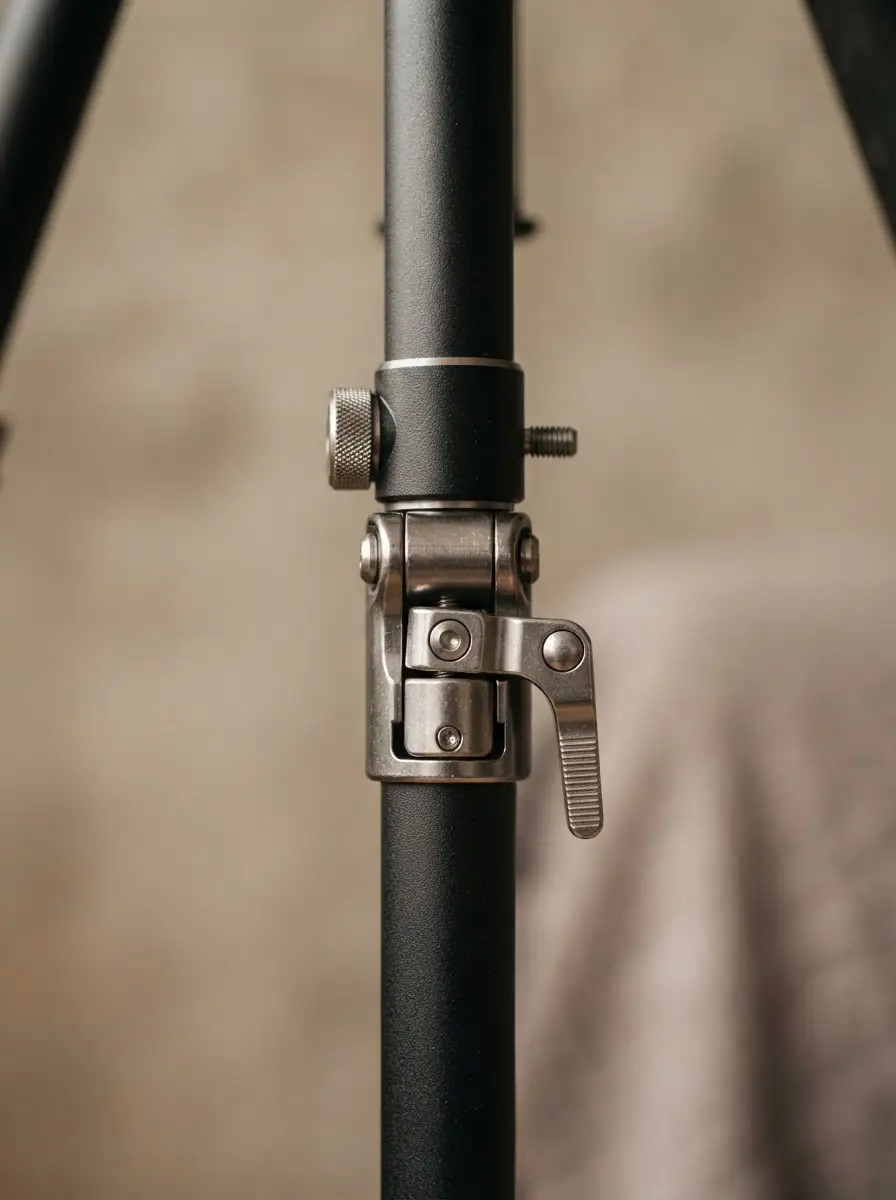
AI-generated editorial illustration; not a product or test photograph.
Short answer
The best budget tripods for most creators are the K&F Concept 64-inch for travel mirrorless setups and the VICTIV 74-inch for versatile eye-level framing. These supports provide the foundational stability needed for sharp images and smooth video while allowing you to save capital for higher-quality lenses, which remain the most critical long-term investment in your kit.
4
Product listings discussed; not hands-on tests
4/4
Discussed listings with a recorded price
$18.89–$49.99
Recorded listing price range; not a complete setup cost
Key takeaways
Prioritize load capacity over extra gadgets to ensure your specific camera and lens combination remains secure.
Aluminum construction is the industry standard for budget support, offering necessary durability at a manageable weight.
Always utilize the center column ballast hook in windy conditions to lower your center of gravity and reduce vibration.
Invest your primary budget in high-quality optics, as these outlast camera bodies and secondary gear.
Check for Arca-Swiss quick-release compatibility to ensure seamless transitions between multiple cameras and mounting plates.
Products discussed in this article
Editorial scores and recorded prices are reference points, not measurements of suitability for every use. Read each review's specifications and limitations.
Selecting the right support is a vital step in your photography & videography journey. When building your kit, it is easy to become overwhelmed by bells and whistles, but core stability remains the priority. Budget tripods largely utilize aluminum alloys, which offer a high strength-to-weight ratio suitable for most mirrorless and point-and-shoot systems. When reviewing potential candidates, we focus on the maximum height and payload rating. An entry-level support like the K&F Concept 64-inch tripod provides a 36mm ball head that locks securely, which is crucial for preventing "creep" during long-exposure photography.
Verify the maximum payload capacity against your heaviest camera and lens combination.
Prioritize models with standard 1/4-inch mounting screws for universal compatibility with your cameras and smartphone adapters.
Consider the folded size if you frequently travel; compact models like the Amazon Basics 50-inch tripod are excellent for tight luggage space.
Look for intuitive leg locks, such as flip-lever designs, which enable rapid deployment in dynamic environments.
Our photography & videography buyer's guide suggests that new photographers often overspend on heavy-duty accessories while under-investing in their glass. Remember the fundamental rule of production: lenses outlive camera bodies. By choosing a functional, reliable budget tripod, you preserve financial resources for superior optical glass, which provides far more impact on final image quality than a premium support system. For those just getting started, researching best camera for beginners is a great way to map out your initial system costs. Always double-check the manufacturer’s load limits before attempting to mount large telephoto setups, as exceeding these specifications can lead to structural flex that ruins frame stability during critical shooting sessions.
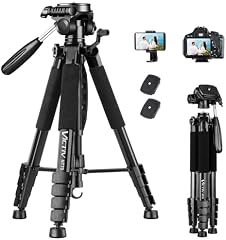
Stability is the primary differentiator between reliable tools and disposable gadgets. A tripod that is too thin or flimsy will inevitably flex under the weight of a professional-grade body or when extended to its full height, leading to blurred images. The VICTIV 74-inch tripod serves as an excellent case study; it provides an impressive 74-inch reach for eye-level framing, but the thin lower leg sections require careful management. To get the most out of these tools, we recommend only extending the thinner bottom sections when absolutely necessary for height. Using the central column weight hook to hang a gear bag can significantly mitigate environmental vibrations caused by wind or nearby surface movement.
Avoid full extension of the center column, as this increases the leverage and potential for sway.
Tighten all pivot points firmly; three-way pan-and-tilt heads rely on friction and must be secured properly.
Use a remote shutter or self-timer to ensure that your hands do not induce shake at the moment of capture.
When exploring mistakes to avoid, remember that portability is a double-edged sword. While a lightweight tripod is easier to carry, it possesses less inherent mass to resist wind gusts. If your work involves filming outdoors, you might need to prioritize a heavier model, even if it is less compact. We discuss these nuances in our buying tips blog, which helps you align your equipment choices with your specific environmental needs. Whether you are a vlogger or a landscape hobbyist, knowing the limits of your support gear allows you to adapt your shooting technique accordingly. Regular inspection of your tripod's leg joints and head tension is a small maintenance task that extends the lifespan of your gear significantly, preventing premature wear on the plastic or metallic collars often found in this price bracket.
Always hang your camera bag from the tripod's center column hook during outdoor sessions. The added weight lowers the center of gravity, significantly reducing vibration in windy conditions.
Versatility for Modern Hybrid Workflows
Modern creators often shift between recording video, streaming, and taking stills, requiring equipment that is as flexible as their production schedules. The XXZU 75-inch aluminum tripod is specifically designed for this hybrid utility, featuring a 360-degree ball head and a bundled smartphone mount that simplifies the transition between mobile devices and DSLR systems. Such versatility is key for solo creators who need a fast, all-in-one setup that can move from a desk-bound interview to a remote outdoor shoot with minimal friction.
Look for tripods that include a mobile phone clamp in the box to add value without needing to buy extra adapters.
Check if the central column is reversible for ground-level macro photography or low-angle filming.
Utilize spirit levels, if integrated into the head, to ensure your horizons are straight before hitting record.
Effective video production requires more than just a stable foundation; it demands technical coordination. Your tripod choice should be the final piece of a broader budget planner strategy that prioritizes your camera, lenses, and memory cards. For instance, if you are capturing 4K video, your support system must be steady, but your memory card must be fast enough to prevent dropped frames. Always verify that your media matches the bitrate requirements of your camera. We explore compatibility questions in our photography & videography FAQ to help you avoid common pitfalls. For hybrid creators, having a dedicated vlogging camera paired with a reliable tripod creates a turn-key solution that minimizes setup time. Investing in standardized, compatible hardware—like Arca-Swiss plates—ensures that you aren't stuck with proprietary connections that limit your future hardware upgrades. A well-chosen budget tripod is not just a stand; it is a reliable production partner that enables consistent framing, no matter how complex your subject matter becomes.
When navigating the budget market, it is essential to acknowledge the mechanical compromises inherent in affordable tripod manufacturing. Manufacturers often achieve lower price points by using composite plastics for joint collars, handle knobs, and lock levers, rather than CNC-machined aluminum or magnesium alloy. While these materials are perfectly adequate for indoor use and lightweight travel, they do not offer the same longevity or resistance to torque as professional studio platforms. When operating a ball head, such as the 36mm unit found on the K&F Concept model, the lock lever should be tightened until firm but not forced. Over-tightening common to budget materials can strip threads or crack plastic housings, rendering the unit inoperable.
Periodically clean the leg segments with a soft cloth to prevent dirt and sand from grinding against the locking mechanisms.
Avoid overtightening your mounting plates, which can sometimes lead to warping over repeated use.
If you notice a head slipping under the weight of a lens, do not force the lock; adjust the center of gravity of your camera on the quick-release plate.
By staying aware of these structural limitations, you can ensure that your gear remains in working condition for years. Budget gear rewards the careful operator. Unlike professional-grade gear built for field abuse, these tripods thrive in controlled settings or with lighter equipment. Many users find that by treating their photography & videography gear with respect—such as using the supplied carry bags for transit rather than leaving it loosely packed—they can keep their budget equipment performing like new. If you are planning a more significant move, like transitioning to full-frame mirrorless cameras, consider how your support foundation will grow with you. Perhaps it is time to reassess your kit, ensuring that every piece of gear contributes directly to your creative efficiency without redundant spending.
Budget tripods have strict weight limits. Exceeding them causes leg flex and joint strain. Always sum the weight of your camera body, lens, and battery to ensure you are well within safe operating parameters.
Maximizing Field Performance
Your tripod's performance in the field is dictated by how you interact with it. A common oversight is failing to account for surface conditions. When shooting on sand, gravel, or uneven outdoor terrain, the tripod's legs should be checked for stability before mounting the camera. The rubber feet provided on most budget models are designed for smooth studio surfaces. For outdoor work, finding flat rock or level ground is essential for stability. If the ground is soft, a small piece of cardboard or a dedicated tripod base cover can prevent the legs from sinking during long, multi-frame exposure sequences.
Practice your setup routine at home; speed is essential when light conditions change rapidly in the field.
Use the spirit level to ensure the base is level before attaching your camera, which saves significant time during editing.
Label your quick-release plates if you have multiple cameras, ensuring you always have the correct plate attached for immediate mounting.
Understanding your photography & videography gear inside and out is the quickest path to professional results. Even if you don't have a $2,000 tripod, you can achieve world-class results by managing your shot parameters effectively. This means understanding exactly what your gear can handle. For example, knowing that your camera's internal stabilization might struggle with a specific long lens, and then using your tripod to compensate, demonstrates a high level of production awareness. We always encourage our readers to experiment; try shots with and without your tripod to see exactly how much vibration it manages to kill in your specific environmental conditions. This hands-on analysis will teach you more about gear stability than any spec sheet. Your tripod is a foundation; by taking the time to learn how to properly secure it, balance your payload, and maintain its components, you unlock the full potential of your imaging system.
When choosing your support system, look past the immediate price tag to the long-term utility. An affordable tripod that lasts three years is a better investment than a cheap one that breaks after three shoots. We select models that exhibit a proven track record of dependability, as evidenced by thousands of user reviews. For beginners who are just starting their photography & videography journey, the goal is to find gear that is "good enough" to not hold them back, but not so expensive that it prevents them from upgrading their camera or lenses when the time comes. This balanced approach allows you to iterate on your kit effectively.
Review aggregated user satisfaction scores to gauge the consistent quality control of a particular brand.
Check for manufacturer warranties, which offer a safety net against unexpected component failure.
Factor in the cost of necessary accessories, such as extra plates or mounting clips, into your total budget.
Our budget planner is a useful tool for visualizing these costs. If you find yourself frequently replacing broken budget gear, it may be time to consider a slightly higher tier of equipment, but for most, a well-cared-for sub-$50 tripod will satisfy their requirements for a long time. The real value of these products is that they get you shooting. They eliminate the barrier of shake-induced motion blur, allowing you to focus on light, composition, and timing. Once your technique evolves to the point where you are regularly pushing the limits of your tripod—perhaps by using heavy pro glass or shooting in extreme conditions—you will have the experience to know exactly what upgrades you need. Until then, these proven budget options provide an exceptional return on investment, helping you capture beautiful, steady content while keeping your primary project funds safe for the glass that truly matters.
1Find a level surface and spread the legs to the desired width for maximum base stability.
2Adjust leg length, starting with the thickest (top) segments first.
3Mount your quick-release plate firmly to the camera, ensuring it is flush.
4Attach the camera to the tripod head, ensuring the locking mechanism clicks or tightens securely.
5Adjust your framing using the pan and tilt controls, then lock all axes.
6Hang your bag on the central hook to finalize stability for your shot.
Quick checklist
Verify your camera's total weight, including lenses and accessories.
Measure your eye level to ensure the tripod offers sufficient height for comfortable use.
Check that the quick-release plate uses a standard 1/4-inch mount.
Ensure the tripod collapses to a size that fits your preferred travel bag.
Test all leg locks and pan-tilt friction knobs for secure operation.
Keep a dedicated cloth in your bag to wipe leg joints after outdoor use.
Frequently asked questions
Are aluminum tripods better than carbon fiber?
Carbon fiber is lighter and better at dampening vibrations, but it is much more expensive. For budget-conscious shooters, aluminum provides a superior strength-to-cost ratio and is reliable for almost all amateur photography and video needs.
Can I use a smartphone on a dedicated camera tripod?
Yes. If your tripod has a standard 1/4-inch mounting screw, you can easily attach a universal phone adapter. Many modern budget tripods come with these adapters included in the box.
Why is a tripod necessary if I have image stabilization?
In-body or lens stabilization helps with handheld jitter, but it cannot replace a tripod for long-exposure photography, time-lapses, or perfectly steady video. A tripod is a foundational tool for creative control.
How do I prevent my camera from shaking when I press the shutter?
The act of pressing the button often causes shake. Always use your camera's built-in self-timer (2-second delay) or a remote shutter release to ensure the camera is perfectly still during the exposure.
How long should a budget tripod last?
If used within its weight capacity and kept clean of dirt and salt, a budget tripod can last for several years of regular hobbyist use. Avoid overtightening the knobs, as this is the most common cause of failure.
Amazon links are affiliate links; we may earn a commission at no cost to you.
Shortlists in this category
Ranked lists from our photography & videography reviews, limited to listings whose titles confirm the product type, with budget cuts where enough recorded prices sit on both sides of the line.
This page summarizes our research reviews of Amazon listings, listed specifications and captured buyer ratings. It is not a hands-on test. Scores are editorial assessments, not measured performance; prices are recorded snapshots and may change. A category can include both main products and accessories, so its overall price range is not the cost of a complete setup.
Most recent product record update: September 14, 2026. Individual records may be older; this is not a verification date for every claim. Prices on this page were read from the listings Nov 8, 2026 – Nov 11, 2026.
Compare the same kind of photography & videography
Choose the product type first. These groups require a match in the listing title; an import search term alone is not enough. Scores rank our recorded research assessments within each group, not independently measured performance.
Values are shown as recorded, without unit conversions or inferred compatibility. Not recorded means unknown, not absent. Prices are snapshots, not current offers. Editorial scores are research judgments, not lab results. Amazon links are affiliate links.
Before treating a comparison as complete
Which details are still unknown?
A specification appearing in a listing is not independent verification. These counts show which shortlisted records contain the same field; a blank record does not mean the product lacks the feature.
Included Components
Recorded for 2 of 2 shortlisted models
Present in every shortlisted record. Check units, exact variants and the current manufacturer documentation before relying on it.
Item Weight
Recorded for 2 of 2 shortlisted models
Present in every shortlisted record. Check units, exact variants and the current manufacturer documentation before relying on it.
Item Length
Recorded for 2 of 2 shortlisted models
Present in every shortlisted record. Check units, exact variants and the current manufacturer documentation before relying on it.
Maximum Height
Recorded for 2 of 2 shortlisted models
Present in every shortlisted record. Check units, exact variants and the current manufacturer documentation before relying on it.
Warranty Description
Recorded for 2 of 2 shortlisted models
Present in every shortlisted record. Check units, exact variants and the current manufacturer documentation before relying on it.
Check sustained record limits and overheating, not headline codecs.
V30/V90 card ratings decide whether high-bitrate video drops frames.
If a specification, certification or compatibility detail is absent, mark it as unknown and ask the seller or manufacturer. Do not substitute a star rating, an editorial score or a different model's specification.