Best drawing tablets

10 drawing tablets from our art supplies & tablets reviews, confirmed by listing title and ranked by editorial score, then buyer rating. Catalogue updated October 5, 2026.

Highest editorial scoreXPPen Artist 12 3rd 11.9" Drawing Tablet with Screen, 16K, X4 Pen, AG GlassXPPen Artist 12 3rd 11.9" Drawing Tablet with Screen, 16K$209.99 · 8.5/10Best score per dollarHUION Inspiroy H640P 6x4 inch Drawing Tablet 8192 Pen PressureHUION Inspiroy H640P 6x4 inch Drawing Tablet 8192 Pen$27.99 · 8.0/10Top buyer rating (50+ reviews)Wacom Intuos Small, Wired Graphic Drawing Tablet with Pen + SoftwareWacom Intuos Small, Wired Graphic Drawing Tablet with Pen$39.95 · 8.1/10
Lowest recorded$27.99
Median$56.98
Highest recorded$299.99
Editorial score by model — research judgments, not lab results

Why these models make the shortlist

Start with fit, then weigh the recorded benefit against the limitation. These are review assessments of the top three listings, not measured advantages over every alternative.

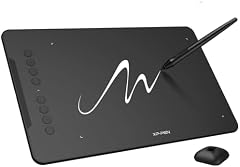
XPPen Deco 01 V3 10x6 Drawing Tablet, 16K Battery-Free Stylus, 8 Keys

XPPen Deco 01 V3 10x6 Drawing Tablet, 16K Battery-Free Stylus, 8 Keys

Recorded intended fit: Budget-conscious illustrators wanting a spacious drawing area

Why consider it

Generous 10x6 inch active working area

What could change your decision

16K pressure levels offer imperceptible practical gains

Connectivity Technology
USB
Compatible Devices
Android Smartphones & Android Tablets, Chromebooks, Laptops & MacBooks, Personal Computers (PC), iMac
Model Name
DECO01V3-BLACK
Read the full review and listing evidence →

Side-by-side: top 4

Same-type recorded prices (USD)
Recorded editorial assessments — not measured performance
Exact-model evidence and specifications
SpecificationXPPen Artist 12 3rd 11.9" Drawing Tablet with ScreenXPPen Deco 01 V3 10x6 Drawing Tablet, 16K Battery-FreeXPPen Artist Pro 14 Gen2 Drawing Tablet with Screen 14Wacom Intuos Small, Bluetooth Graphic Drawing Tablet
Recorded price$209.99$44.00$299.99$69.95
Review trade-off11.9-inch panel feels restricted by UI pallets16K pressure levels offer imperceptible practical gainsHigher price bracket approaches standalone tablet costsSmall active area restricts sweeping arm movements
Connectivity Technology3-in-1 HDMI, USBUSBHDMI, USB-C to USB-CBluetooth, USB-A
Compatible DevicesDesktop, Laptop, Smartphone, TabletAndroid Smartphones & Android Tablets, Chromebooks, Laptops & MacBooks, Personal Computers (PC), iMacDesktop, Laptop, TabletNot recorded
Pressure Sensitivity16384 levels16384 levels16384 levels4096 levels
Warranty Description1 Year Warranty12-Month1 Year Warranty1 year
Original listingAmazon · B0FQJDRFFGAmazon · B077P6BQP7Amazon · B0C2C22BTDAmazon · B079J2FSQ7

Values are shown as recorded, without unit conversions or inferred compatibility. Not recorded means unknown, not absent. Prices are snapshots, not current offers. Editorial scores are research judgments, not lab results. Amazon links are affiliate links.

Compare the leading two models →

Before treating a comparison as complete

Which details are still unknown?

A specification appearing in a listing is not independent verification. These counts show which shortlisted records contain the same field; a blank record does not mean the product lacks the feature.

Connectivity Technology

Recorded for 4 of 4 shortlisted models

Present in every shortlisted record. Check units, exact variants and the current manufacturer documentation before relying on it.

Compatible Devices

Recorded for 3 of 4 shortlisted models

Pressure Sensitivity

Recorded for 4 of 4 shortlisted models

Present in every shortlisted record. Check units, exact variants and the current manufacturer documentation before relying on it.

Warranty Description

Recorded for 4 of 4 shortlisted models

Present in every shortlisted record. Check units, exact variants and the current manufacturer documentation before relying on it.

Target Audience

Recorded for 3 of 4 shortlisted models

Your shortlist

Explore the recorded differences

All 10 title-confirmed models, in editorial ranking order. Specification values are copied from their review records, not independently measured. With a price limit set, models without a recorded price are excluded.

10 of 10 models · 0/2 selected

  1. Connectivity Technology

    3-in-1 HDMI, USB

    Review limitation: 11.9-inch panel feels restricted by UI pallets

  2. Connectivity Technology

    USB

    Review limitation: 16K pressure levels offer imperceptible practical gains

  3. Connectivity Technology

    HDMI, USB-C to USB-C

    Review limitation: Higher price bracket approaches standalone tablet costs

  4. Connectivity Technology

    Bluetooth, USB-A

    Review limitation: Small active area restricts sweeping arm movements

  5. Connectivity Technology

    Not recorded — confirm the exact model before buying.

    Review limitation: Small drawing surface limits broad gestures

  6. Connectivity Technology

    USB

    Review limitation: Screen surface may require a matte protector for bite

  7. Connectivity Technology

    USB

    Review limitation: Compact 6x4-inch active area limits sweeping strokes

  8. Connectivity Technology

    USB

    Review limitation: Driver reliability can vary across OS updates

  9. Connectivity Technology

    USB

    Review limitation: Requires manual color profiling out of box

  10. Connectivity Technology

    USB

    Review limitation: Small 6x4 active area restricts broad drawing strokes

Prices are snapshots. Check exact variants and units; differently named fields may describe the same specification.

All drawing tablets ranked

XPPen Artist 12 3rd 11.9" Drawing Tablet with Screen, 16K, X4 Pen, AG Glass

No. 01 — Artists needing durable etched glass in small spaces

XPPen Artist 12 3rd 11.9" Drawing Tablet with Screen, 16K, X4 Pen, AG Glass

$209.994.41,051 ratingsOur score 8.5/10

A modernized compact display that uses etched anti-glare glass rather than protective film to combat parallax and improve nib drag. The 11.9-inch diagonal makes it easily transportable, though operating complex digital audio or illustration software feels constrained. It suits artists working on mobile laptop setups who demand durable glass.

  • Etched anti-glare glass resists scratches and glare
  • Tight optical bonding eliminates cursor parallax
  • Compact chassis fits easily in laptop sleeves
  • 11.9-inch panel feels restricted by UI pallets
  • Higher price per square inch than larger displays
XPPen Deco 01 V3 10x6 Drawing Tablet, 16K Battery-Free Stylus, 8 Keys

No. 02 — Budget-conscious illustrators wanting a spacious drawing area

XPPen Deco 01 V3 10x6 Drawing Tablet, 16K Battery-Free Stylus, 8 Keys

$44.004.514,476 ratingsOur score 8.3/10

Provides a generous ten-by-six-inch drawing surface at an entry-level price. The advertised 16K pressure levels offer diminishing returns over standard 8192 levels, as drawing feel depends far more on hand travel and surface friction. It is a capable, no-frills slate for students and photo retouchers.

  • Generous 10x6 inch active working area
  • Eight customizable physical shortcut keys
  • Battery-free stylus requires no charging
  • 16K pressure levels offer imperceptible practical gains
  • Smooth plastic surface lacks natural paper tooth
XPPen Artist Pro 14 Gen2 Drawing Tablet with Screen 14 inch Graphic Art Tablet with Full Laminated Anti-Glare Screen 16384 Pressure Levels X3 Pro Battery-Free Stylus 123% sRGB Tilt Stand Mini Keydial

No. 03 — Digital painters wanting etched glass and broad gamut

XPPen Artist Pro 14 Gen2 Drawing Tablet with Screen 14 inch Graphic Art Tablet with Full Laminated Anti-Glare Screen 16384 Pressure Levels X3 Pro Battery-Free Stylus 123% sRGB Tilt Stand Mini Keydial

$299.994.41,754 ratingsOur score 8.3/10

A premium 14-inch pen display featuring an etched anti-glare glass surface that delivers genuine tooth without relying on stick-on films. The wide 123% sRGB gamut provides dependable color separation for digital painting. The included external keydial resolves shortcut access without cluttering the display chassis.

  • Etched anti-glare glass provides tactile tooth
  • Wide 123% sRGB color gamut coverage
  • Included wireless Keydial optimizes desk ergonomics
  • Higher price bracket approaches standalone tablet costs
  • 16K pressure levels offer minimal real-world advantage
Wacom Intuos Small, Bluetooth Graphic Drawing Tablet with Pen + Software

No. 04 — Entry-level digital sketching and compact desk setups

Wacom Intuos Small, Bluetooth Graphic Drawing Tablet with Pen + Software

$69.954.45,630 ratingsOur score 8.2/10

At roughly seventy dollars, this screenless tablet provides wireless connectivity and dependable driver support without introducing the parallax complications of low-cost display monitors. The small form factor requires acclimating to a compressed drawing area and off-screen hand-eye coordination. It is an affordable, functional entry point where surface texture and software stability matter more than sheer pressure specifications.

  • Bluetooth connectivity reduces workspace cable clutter
  • No display eliminates parallax concerns entirely
  • Accessible price point for dependable hardware support
  • Small active area restricts sweeping arm movements
  • Steep learning curve for off-screen hand-eye coordination
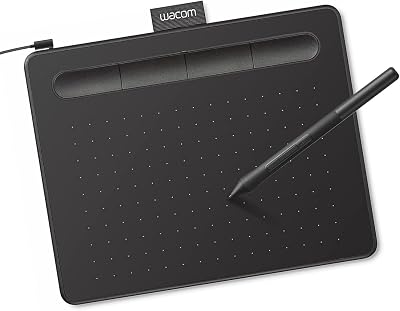
Wacom Intuos Small, Wired Graphic Drawing Tablet with Pen + Software

No. 05 — Beginners seeking reliable driver stability on desktop

Wacom Intuos Small, Wired Graphic Drawing Tablet with Pen + Software

$39.954.623,907 ratingsOur score 8.1/10

Industry-standard entry slate that delivers dependable pen response and reliable driver support. The small active surface restricts sweeping gestures from the elbow, requiring reliance on wrist movement. Texture simulates fine-grain paper well, though standard nibs wear steadily over heavy use.

  • Dependable operating system driver stability
  • Compact footprint fits crowded work desks
  • Bundled downloadable creative software licenses
  • Small drawing surface limits broad gestures
  • Wired connection restricts ergonomic positioning
HUION Kamvas Pro 16 Drawing Tablet with Screen,120% sRGB, Touch Bar,15.6"

No. 06 — Budget digital illustrators needing desktop screen space

HUION Kamvas Pro 16 Drawing Tablet with Screen,120% sRGB, Touch Bar,15.6"

$289.994.54,416 ratingsOur score 8.1/10

At under $300 for a 15.6-inch display, this tablet targets illustrators seeking usable workspace without the premium studio brand tax. The primary trade-offs at this price tier involve driver consistency and surface texture, which feels distinctly slicker than textured drawing films. Parallax is minimized by the bonded panel, making it a functional desktop workhorse if paired with a calibrated monitor.

  • Sub-$300 pricing for a 15.6-inch drawing area
  • Physical express keys paired with a touch bar
  • Wide 120% sRGB claimed color space
  • Screen surface may require a matte protector for bite
  • Dependent on external PC host and cabling setup
HUION Inspiroy H640P 6x4 inch Drawing Tablet 8192 Pen Pressure

No. 07 — Budget digital sketching and compact desk setups

HUION Inspiroy H640P 6x4 inch Drawing Tablet 8192 Pen Pressure

$27.994.414,405 ratingsOur score 8.0/10

This screenless tablet delivers standard 8,192 pressure levels, though drawing comfort depends entirely on the tactile resistance of the surface rather than pressure specs. Because work appears on an external monitor, parallax is eliminated, but hand-eye coordination takes time to adapt. The 6x4-inch drawing area is space-efficient but constrains broad, full-arm strokes.

  • Zero optical parallax due to screenless design
  • Industry-standard 8192 levels of pressure sensitivity
  • Battery-free stylus requires no charging
  • Compact 6x4-inch active area limits sweeping strokes
  • Matte surface texture wears down plastic nibs
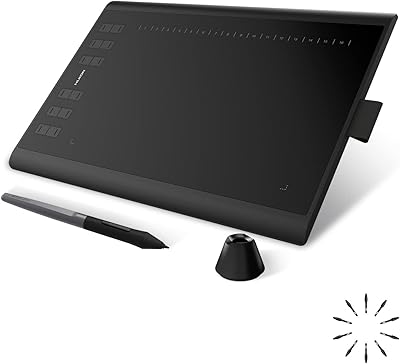
HUION Inspiroy H1060P Graphics Drawing Tablet, 10 x 6.25 in, 12+16 Hot Keys

No. 08 — Digital artists heavily reliant on keyboard shortcuts

HUION Inspiroy H1060P Graphics Drawing Tablet, 10 x 6.25 in, 12+16 Hot Keys

$41.794.47,235 ratingsOur score 7.9/10

A mid-sized graphics slate built around physical shortcut management with twelve hardware buttons and sixteen soft keys. The active area provides adequate travel for natural line work without consuming the entire desk. Driver updates occasionally require troubleshooting on modern operating systems.

  • Extensive hardware and soft shortcut array
  • Balanced 10x6.25 inch active workspace
  • Battery-free stylus with functional tilt response
  • Driver reliability can vary across OS updates
  • Plastic surface wears smooth over heavy sessions
XPPen Artist 13.3 Pro 13.3" Drawing Tablet with Screen, 16K, Full-Laminated

No. 09 — Intermediate artists needing a calibrated portable screen

XPPen Artist 13.3 Pro 13.3" Drawing Tablet with Screen, 16K, Full-Laminated

$211.004.53,436 ratingsOur score 7.8/10

A well-balanced 13.3-inch display that pairs full panel lamination with a comfortable physical shortcut dial. Lamination reduces parallax significantly, placing the cursor directly under the nib. While color coverage is decent for hobbyists, serious print work requires thorough external color calibration.

  • Full lamination significantly reduces optical parallax
  • Useful mechanical dial for brush and zoom control
  • Practical 13.3-inch screen size for workspaces
  • Requires manual color profiling out of box
  • Cable harness creates desk clutter without adapters
Drawing Tablet XPPen StarG640 Digital Graphic Tablet 6x4 Inch Art Tablet with Battery-Free Stylus Pen Tablet for Mac, Windows and Chromebook (Drawing/E-Learning/Remote-Working)

No. 10 — Budget digital sketching and handwritten input

Drawing Tablet XPPen StarG640 Digital Graphic Tablet 6x4 Inch Art Tablet with Battery-Free Stylus Pen Tablet for Mac, Windows and Chromebook (Drawing/E-Learning/Remote-Working)

$28.994.321,310 ratingsOur score 7.7/10

The StarG640 is an entry-level tethered graphics tablet with a compact 6x4 inch active workspace. Because it is a screenless digitizer, parallax is entirely eliminated, though the plastic surface lacks the tooth of premium paper. Buyers should expect a functional input device for navigation and basic line work, constrained mainly by hand-to-eye desktop adaptation.

  • Battery-free stylus requires no charging
  • Zero screen parallax due to non-display design
  • Compact footprint fits tight desktop spaces
  • Small 6x4 active area restricts broad drawing strokes
  • Smooth plastic surface provides minimal tactile resistance

Quick answers

What is the best drawing tablet?
In our research, XPPen Artist 12 3rd 11.9" Drawing Tablet with Screen, 16K, X4 Pen, AG Glass leads the editorial ranking (8.5/10) among 10 title-confirmed drawing tablets. Buyer ratings break score ties. Scores are research judgments, not lab tests.
How much does a drawing tablet cost?
Recorded prices for the 10 priced drawing tablets we reviewed range from $27.99 to $299.99, with a median of $56.98. Prices are snapshots and change often.
What should I check before buying a drawing tablet?
Check the exact model's intended use, included equipment and recorded trade-offs first. Our art supplies & tablets criteria cover several product types; apply the checks relevant to your drawing tablet: Pressure levels plateau; parallax and texture are what you feel. For wet media, check paper sizing, composition and format as well as weight; even heavy paper can buckle depending on water use and stretching. Lightfastness ratings decide whether work survives a decade.

Keep researching

Sources and limits

This page summarizes our research reviews of Amazon listings, listed specifications and captured buyer ratings. It is not a hands-on test. Scores are editorial assessments, not measured performance; prices are recorded snapshots and may change. A category can include both main products and accessories, so its overall price range is not the cost of a complete setup.

Most recent product record update: October 5, 2026. Individual records may be older; this is not a verification date for every claim.

Amazon links are affiliate links. We may earn a commission on qualifying purchases, at no extra cost to you.