Art supplies & tablets

HUION Kamvas Pro 16 Drawing Tablet with Screen,120% sRGB, Touch Bar,15.6"

The HUION Kamvas Pro 16 combines a fully laminated, anti-glare etched glass display with standard 8,192 pressure levels at an accessible sub-$300 price point. While dependent on a tethered host computer via a 3-in-1 cable, its bundled adjustable stand and wide color gamut deliver practical desktop utility for digital artists.

Research review based on the manufacturer's listing, published specifications and buyer ratings, updated 05/10/2026. Not a hands-on test — see how we review.

HUION Kamvas Pro 16 Drawing Tablet with Screen,120% sRGB, Touch Bar,15.6"
Price

$289.99

Amazon rating

4.5

4.5
Ratings

4,416

Best for Budget digital illustrators needing desktop screen space

At under $300 for a 15.6-inch display, this tablet targets illustrators seeking usable workspace without the premium studio brand tax. The primary trade-offs at this price tier involve driver consistency and surface texture, which feels distinctly slicker than textured drawing films. Parallax is minimized by the bonded panel, making it a functional desktop workhorse if paired with a calibrated monitor.

What we like

  • Sub-$300 pricing for a 15.6-inch drawing area
  • Physical express keys paired with a touch bar
  • Wide 120% sRGB claimed color space

What to weigh up

  • Screen surface may require a matte protector for bite
  • Dependent on external PC host and cabling setup
Check today's price on Amazon

Price and rating were captured on 05/10/2026 and change often. We earn a commission on qualifying purchases.

Our scorecard

Weighted against our category rules
8.1out of 10
Overall
  • Screen lamination and texture8.5

    Full lamination minimizes parallax; anti-glare glass provides tactile drawing resistance.

  • Pen accuracy and tilt8.2

    Battery-free stylus supports 60-degree tilt and standard 8,192 pressure levels.

  • Color reproduction8.6

    Wide 120 percent sRGB color gamut volume handles general digital illustration.

  • Ergonomics and physical controls8.0

    Six express buttons, touch bar, and bundled adjustable stand aid posture.

  • Connectivity and setup7.4

    Requires 3-in-1 breakout cable tethered to a host PC.

The full review

Design and build

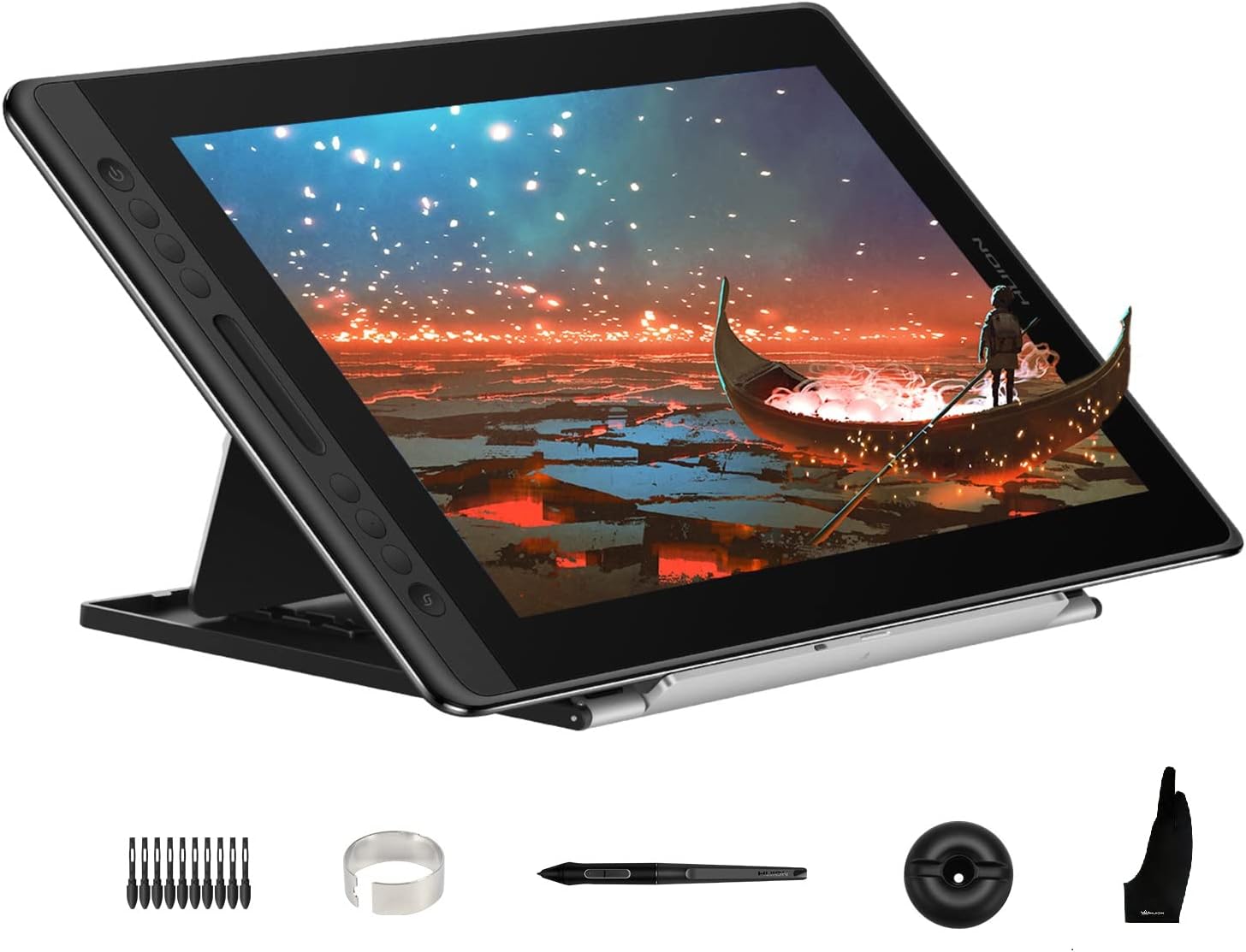
The Kamvas Pro 16 centers around a 15.6-inch full-laminated panel integrated beneath chemically etched anti-glare glass. Lamination eliminates the air gap between the digitizer surface and LCD, directly addressing pen-to-cursor gap. The glass exterior avoids the peel risk associated with matte plastic films while imparting a mild tooth that moderates stylus slip. Physically, the chassis incorporates six programmable click keys alongside a central touch bar on the left bezel, allowing physical mapping of canvas zoom, brush scaling, or scroll actions. Huion bundles the ST200 metal-hinge foldable stand, which supports working inclines between 20 and 60 degrees to counter neck strain during prolonged drafting sessions. Connectivity relies on an integrated recessed port utilizing a proprietary 3-in-1 breakout cable that splits into HDMI, USB data, and an external AC power lead. While the construction feels sufficiently rigid and keeps table footprint manageable, the reliance on a multi-branch cable assembly dictates dedicated desk routing rather than quick pack-and-go portability.

Real-world performance

As digitizer technology has matured, raw pressure sensitivity ratings past several thousand increments yield diminishing returns; the tactile interface and parallax mitigation matter considerably more. The Kamvas Pro 16 implements 8,192 pressure steps and 60 degrees of tilt via the battery-free PW507 stylus. Tracking shows minimal offset near the active center, aided by the laminated panel assembly, though corner accuracy warrants calibration across varied grip angles. The anti-glare glass offers balanced friction against standard plastic nibs without excessive drag. Visual output is anchored by a 1000:1 contrast ratio and a specified color volume of 120 percent sRGB (92 percent AdobeRGB). This provides saturated, clean color translation suitable for web-directed illustration and graphic work, though production prepress operators should independently verify factory gamma and calibration stability with a colorimeter. The passive pen eliminates internal battery charging cycles, and latency remains consistently low when tethered to supported Windows, macOS, or Ubuntu Linux workstations.

Value for money

At $289.99, the Kamvas Pro 16 targets an entry-to-intermediate desktop tier that previously offered only opaque graphics tablets or smaller 12-inch displays. Its 4.5 out of 5 composite score across more than 4,400 user evaluations indicates stable hardware consistency in field use. Much of the value proposition lies in the comprehensive inclusion of essential peripherals: rather than selling the ST200 angle stand, drawing glove, or pen cradle as auxiliary add-ons, Huion packs them alongside ten replacement nibs inside the box. Comparable medium-format creative displays often exclude articulated stands at baseline pricing or rely on air-gapped glass that degrades line precision. While higher-end competitors offer native single-cable USB-C video or higher resolution panels, the Kamvas Pro 16 provides an economical balance of functional panel size, adequate color volume, and hardware ergonomics without requiring immediate secondary accessory purchases.

Who should skip it

Prospective buyers must note that the Kamvas Pro 16 is strictly an external input monitor; it lacks an internal processor, operating system, or battery, making it entirely unsuitable for artists seeking a self-contained portable sketchbook like an iPad or standalone mobile studio. Mobile creatives working from cramped spaces or modern laptops that only supply Thunderbolt ports may find the bulky 3-in-1 HDMI cabling system cumbersome to adapt. Furthermore, professional retouchers and prepress production specialists who require factory-certified color accuracy, true DCI-P3 compliance, or 4K resolution across a 15.6-inch diagonal should bypass this unit. Finally, digital painters who insist on an entirely toothless, glossy surface will find the anti-glare glass texture counterproductive, while ultra-heavy pen users should consider that replacement nibs will eventually experience steady wear against the micro-etched glass face over extended operational cycles.
Specifications

As listed by the manufacturer
BrandHUION
Model NameKamvas Pro 16
Built-In MediaDigital Pen PW507, 3-in-1 Cable, Power Adapter, Foldable Stand ST200, Pen Holder PH05, Pen Nib x 10, Nib Clip, Glove, Cleaning Cloth, Quick Start Guide
Target AudienceTeacher
Model NumberKamvas Pro 16
Number of Items1
ManufacturerShenZhen Huion Animation Technology Co., LTD
Item HighlightFully Laminated Anti-Glare Glass, 6 Shortcut Keys, Adjustable Stand, Works with Windows, Mac and Linux
Unit Count1 Count
Item Type NameComputer Graphics Tablet
Mfr Part NumberGT-156-US-Stand
Connectivity TechnologyUSB
Pressure Sensitivity8192 levels
Operating SystemLinux(Ubuntu), Mac OS 10.12 and above, Windows 7 and above
Additional Features60° Tilt Support, Anti-Glare Glass, Full Lamination, Programmable Press Key
Specific Uses For ProductDesigning, Drawing, Painting

What the maker claims

  • [Outstanding Visuals] You can enjoy immersive viewing in great clarity and fine detail with the help of 15.6-inch full-laminated screen and anti-glare glass of the Huion Kamvas Pro 16 drawing tablet with screen. For a good feel while drawing, the graphics drawing monitor contains smooth but slight texture.
  • [Brilliant Color] See your creations in vibrant and true-to-life colors on this pen display with 120% sRGB (92% AdobeRGB) color gamut volume(16.7 million 8-bit). 1000:1 contrast ratio shows shadow details clearer and sharper.
  • [Optimized Workflow] Kamvas pro 16 drawing monitors comprise with 6 customized express keys and a touch bar which is helpful to get access to favorite shortcuts of keywords or mouse to achieve different operations like zooming in and out, adjusting brush size, saving time and keystrokes.
  • [Adjustable Stand ST200] The adjustable stand can be moved between 20 and 60 degrees to suit your working way, which helps reduce tension for your neck, shoulder, and back, and offers you the best viewing angle for drawing and typing.
  • [Advanced Pen Performance]The art tablet includes a pen without battery which provides accurate and responsive performance, 60° tilt recognition, and virtually lag-free tracking. Moreover, the pen contains 2 side buttons that can be programmable to the software’s shortcuts.
  • [More convenient and tidier] This drawing tablet can be easily connected with the 3-in-1 USB-C cable (HDMI signal), which not only frees you from messy wire bundles but also supports connections for multiple purposes.
  • [Strong Compatibility] The tablet works well with Windows 7 or later, macOS 10.12 or later, and Linux(Ubuntu) and has good compatibility with creative software like Adobe Photoshop, Clip Studio Paint, SAI, Lightroom, etc.
  • [Warm Tips] The Kamvas Pro 16 Pen display is not a standalone product, this device must be connected to a computer/laptop to work.

How it compares

Same category
ProductPriceRatingRatings countOur score
HUION Kamvas Pro 16 Drawing Tablet with Screen,120% sRGB, To (this one)$289.994.54,416 ratings8.1
Wacom Intuos Small, Wired Graphic Drawing Tablet with Pen + $39.954.623,907 ratings8.1
XPPen Deco 01 V3 10x6 Drawing Tablet, 16K Battery-Free Stylu$44.004.514,476 ratings8.3
XP-PEN Artist12 11.6 Inch FHD Drawing Monitor Pen Display Gr$169.994.412,124 ratings7.5
Caliart Alcohol Markers 100 Colors Dual Tip Fine & Chisel Ar$39.994.610,195 ratings7.3

Common questions

Can this tablet operate independently without a computer?
No, the Kamvas Pro 16 is an external drawing monitor, not a standalone computer. It requires a continuous connection to a host system running Windows 7 or newer, macOS 10.12 or newer, or Ubuntu Linux. It processes input and displays output fed directly from your primary machine.
How does the laminated screen affect drawing performance?
Full lamination bonds the display glass directly to the LCD panel below, eliminating the internal air gap. This significantly reduces parallax, meaning the digital stroke appears directly beneath the physical pen tip rather than floating above it, which improves drafting accuracy and line placement consistency.
Does the stylus require charging or internal batteries?
The included PW507 stylus uses passive electromagnetic resonance technology and functions completely without batteries or charging cables. It draws operational power wirelessly from the active digitizer grid in the display panel, allowing uninterrupted drawing without runtime limitations or internal battery degradation over time.
How durable is the anti-glare glass against pen wear?
The anti-glare treatment is chemically etched directly into the glass rather than applied as a soft plastic film, preventing peeling. However, the micro-textured surface will gradually wear down plastic pen nibs over time. Huion includes ten replacement nibs in the pen stand to address ongoing friction wear.

How we judge art supplies & tablets

  1. Rule 01

    Pressure levels plateau; parallax and texture are what you feel.

  2. Rule 02

    Paper weight above 300 gsm handles wet media without buckling.

  3. Rule 03

    Lightfastness ratings decide whether work survives a decade.

Ready to buy?

Prices move daily. Check the current listing before you decide — the figures above were captured on 05/10/2026.

View on Amazon