Design and build
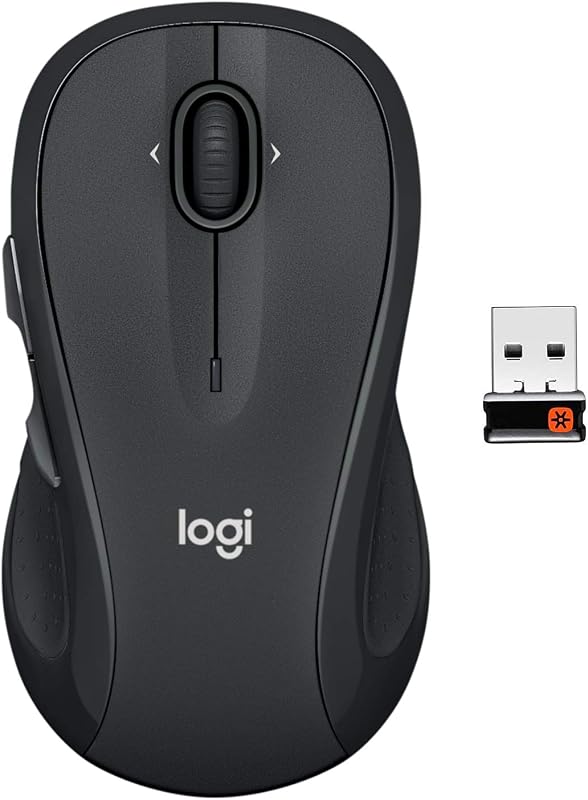
The Logitech M510 adopts a full-size form factor measuring around an ergonomic graphite shell, tailored specifically for conventional desk setups. Although the overall chassis profile appears largely symmetrical, the physical button assignment confirms a right-handed orientation due to the dual navigation switches placed exclusively on the left flank. Logitech integrates soft rubberized grip strips along the lateral curves, providing tactile purchase and palm stabilization during extended desktop sessions. The internal cavity beneath the top cover houses two standard AA alkaline batteries alongside dedicated storage for the Unifying receiver, making transit organized. Build materials consist primarily of rigid molded plastics, consistent with consumer office equipment in this bracket. While functional out of the box, rubberized elements on utility mice often exhibit surface wear or softening under sustained friction over multiple years of daily usage. The physical click switches offer standard tactile feedback without the modular hot-swap serviceability found on specialized desk peripherals.
Real-world performance
Daily navigation with the M510 centers on a fixed 1,000 DPI optical tracking engine paired with Logitech's proprietary 2.4 GHz Unifying connection. The sensor delivers adequate cursor response for administrative spreadsheets, document processing, and general web browsing on standard 1080p desktop monitors. However, the lack of adjustable sensitivity limits efficiency across ultrawide or high-density 4K displays where rapid cross-screen travel is necessary. Button mechanics are broad, offering seven distinct control inputs. Beyond standard primary clicks, the scroll wheel supports lateral tilt actuation, facilitating horizontal navigation across expansive financial sheets without dragging on-screen scrollbars. The 2.4 GHz connection maintains operational stability up to 10 meters, avoiding noticeable dropped packets in standard home office conditions. The integrated on/off switch and automatic sleep states regulate draw from the two included AA cells, maintaining the manufacturer's two-year operational target without forcing the user to manage frequent recharge cycles at the desk.
Value for money
Priced at $27.99, the Logitech M510 sits firmly within the budget office peripheral segment, backed by a strong 4.6-star aggregate rating across more than 35,000 recorded consumer evaluations. The primary value proposition stems from its low operational friction; supplying up to twenty-four months of battery life directly from two pre-installed AA batteries virtually eliminates desktop downtime associated with internal lithium-ion degradation. Furthermore, the inclusion of the Unifying receiver allows users to bind compatible Logitech wireless keyboards to the same single USB-A transceiver, conserving physical port availability on desktop towers and docking stations. For purchasers outfitting home offices or secondary workstations, the combination of side navigation buttons, tilt scrolling, and dependable wireless transmission provides practical utility that rivals more expensive enterprise peripherals, provided the fixed optical resolution meets the user’s display requirements.
Who should skip it
Users managing multi-display workstation arrays or high-resolution creative workflows should look past the M510, as the 1,000 DPI optical sensor cannot adjust tracking speed to match dense pixel grids. Left-handed users must also exercise caution; although the outer shell is ambidextrous in symmetry, the thumb-activated back and forward switches sit on the left rim, rendering them clumsy for southpaw operation. Gamers requiring low-latency microswitches, high polling rates, and customizable sensor tracking will find the basic office-oriented optical architecture insufficient for fast-paced tracking. Additionally, mobile workers operating modern ultrabooks equipped strictly with USB-C ports should skip this device unless they plan to carry a separate legacy USB-A hub, as the M510 lacks native Bluetooth pairing. Those who prioritize all-day vertical ergonomic relief to alleviate forearm pronation will also find the traditional horizontal palm orientation insufficiently restorative.