Mechanical keyboards & desk accessoriesMore from Logitech

Logitech G305 Lightspeed Wireless Gaming Mouse - Black

The Logitech G305 Lightspeed brings reliable 1 ms tracking and long-lasting optical performance to budget desk setups at $29.99. Powered by a single replaceable AA battery and built on a compact symmetrical frame, it emphasizes practical longevity over modern ultra-lightweight design.

Research review based on an Amazon listing, recorded specifications and captured buyer ratings. Product record updated 15/09/2026; this does not verify every claim or refresh every price. Not a hands-on test — see how we review.

Logitech G305 Lightspeed Wireless Gaming Mouse - Black
Price

$29.99

Amazon rating

4.6

4.6
Ratings

39,977

Best for Hybrid gaming and general productivity desk setups

At thirty dollars, the G305 provides class-leading tracking precision and wireless response times for both gaming and daily productivity. The egg-shaped body is compact, and the single AA battery design shifts the center of gravity toward the rear. It remains one of the most cost-effective performance mice available if you prefer a smaller form factor.

What we like

  • Low-latency Lightspeed wireless performance
  • Accurate sensor tracking without smoothing
  • Crisp, durable mechanical button switches

What to weigh up

  • Battery placement creates a rearward weight bias
  • Small egg profile lacks dedicated palm ergonomics
Check today's price on Amazon

Price and rating are recorded snapshots and may predate the record update. We earn a commission on qualifying purchases.

Our scorecard

Research-based assessment
8.8out of 10
Overall
  • Sensor tracking9.0

    Tracks cleanly up to 12,000 DPI without perceptible smoothing or acceleration.

  • Wireless latency9.2

    Proprietary 1 ms Lightspeed transmission delivers wired-equivalent input reliability.

  • Battery economy9.4

    Offers 250 continuous hours from a standard, easily replaceable AA battery.

  • Chassis ergonomics7.3

    Compact symmetrical shell is slightly rear-heavy with default alkaline battery.

  • Long-term value9.1

    Exceptional component quality and tracking precision for a sub-thirty-dollar peripheral.

The full review

Design and build

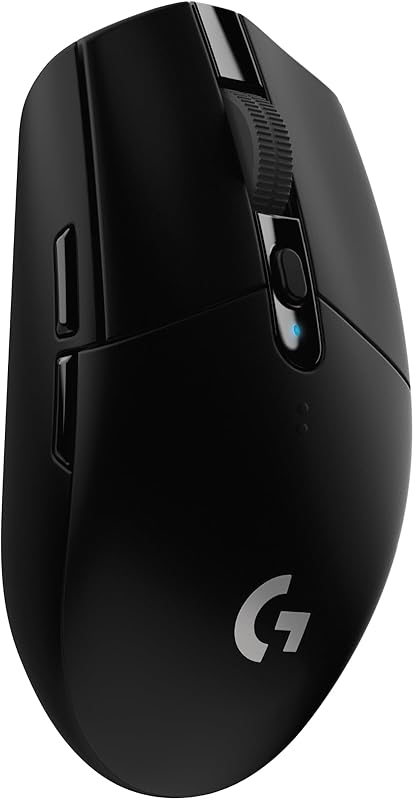
The Logitech G305 Lightspeed utilizes a classic egg-shaped ambidextrous chassis that measures 99 grams (3.4 ounces) with the included AA alkaline battery installed. Its external shell is constructed from standard hard matte plastic, eschewing rubberized side grips that tend to degrade or become gummy over extended desk use. Six physical buttons comprise the layout: primary left and right clickers, a clickable scroll wheel, a DPI cycle switch, and two thumb buttons located on the left flank. Under the removable top plate sits a dedicated storage compartment for the USB nano receiver, making the unit practical to transport alongside a laptop. While the symmetrical profile accommodates both claw and fingertip grips well, users with larger hands will find the compact footprint somewhat restrictive for full palm placement. The structural assembly remains rigid without noticeable panel flexing, although the single AA battery bay shifts the center of gravity slightly toward the rear of the unit.

Real-world performance

Tracking accuracy is driven by Logitech’s HERO optical sensor, which scales from 200 to 12,000 DPI alongside a maximum velocity rating of 400 IPS. In practice, the sensor maintains consistent 1:1 tracking without hardware acceleration, smoothing, or jitter across standard cloth and hard mouse pads. Connection stability relies on proprietary Lightspeed wireless technology, transmitting at a competitive 1 millisecond (1,000 Hz) polling rate via the 2.4 GHz USB receiver. The manufacturer rates continuous performance at 250 hours using the default performance mode on a single AA battery. For non-gaming desk duties, toggling Endurance mode through the Logitech G HUB utility caps the report rate to extend power reserves up to nine months. Signal integrity remains steady within standard desktop ranges, matching wired latency benchmarks without visible packet drops or interference. Actuation on the primary buttons yields crisp mechanical feedback, though the click volume is pronounced compared to dampened office mice.

Value for money

At an entry price of $29.99, the Logitech G305 offers an exceptional ratio of performance to cost within the desk peripheral segment. Maintaining an aggregate score of 4.6 out of 5 stars across nearly 40,000 customer ratings, it occupies a dominant position among budget-conscious wireless pointers. Many competitors in this sub-$30 category compromise on proprietary radio tech by defaulting to lag-prone generic Bluetooth or sub-standard office optical sensors. In contrast, the G305 bundles an identical HERO sensor architecture and Lightspeed transceiver found in more expensive legacy gaming mice. While the reliance on disposable AA cells rather than an integrated lithium-ion battery adds a marginal recurring cost, it ensures the peripheral remains operational long after built-in batteries typically degrade. The build quality avoids unnecessary aesthetic flourishes like decorative RGB lighting, focusing purely on component longevity, dependable switches, and low battery consumption, representing practical value for both home desks and mobile laptop workstations.

Who should skip it

Prospective buyers seeking an ultra-lightweight competitive mouse should look elsewhere, as modern esports options routinely weigh under 60 grams compared to the G305's 99-gram curb weight. Reducing this mass requires aftermarket lithium AAA cells and spacer adapters, which adds unnecessary hassle for users who want optimal balance straight out of the box. True left-handed users must also proceed with caution; while the central egg silhouette is ambidextrous, the side navigation buttons are exclusively situated on the left, favoring right-handed operation. Ergonomically, individuals who prefer a wide, contoured palm rest with thumb support will likely find the compact dimensions fatiguing during long work sessions. Users committed to minimalist setups without loose batteries may also dislike swapping alkaline cells and keeping track of an external USB dongle, given the absence of native Bluetooth support or USB-C charging ports.
Specifications

Recorded from the listing
Connectivity TechnologyUSB
Compatible DevicesLaptop, Personal Computer
Battery Average Life250 hours
Power SourceBattery Powered
Additional FeaturesWireless
Movement DetectionOptical
Button Quantity6
Hand OrientationAmbidextrous
Number of Batteries1 AA batteries required. (included)
Hardware PlatformPC/Mac
Mouse Maximum Sensitivity12000 dots_per_inch
Range1.0 meters
ColorBlack
Style NameClassic

What to confirm for this exact model

Potential fit
Hybrid gaming and general productivity desk setups. Confirm that the model and included equipment meet your intended use.
Trade-off to resolve
Battery placement creates a rearward weight bias Check whether this matters for your setup before ordering.
Included equipment and compatibility
Check the exact variant, quantity, dimensions, required accessories and any applicable power or connection requirements. A missing specification is unknown, not proof that a feature is absent.
Ownership and purchase terms
Verify seller, delivered price, return conditions and manufacturer warranty for your location. Check replacement parts and ongoing costs where applicable.

What the maker claims

  • The next-generation optical HERO sensor delivers incredible performance and up to 10x the power efficiency over previous generations, with 400 IPS precision and up to 12,000 DPI sensitivity
  • Ultra-fast LIGHTSPEED wireless technology gives you a lag-free gaming experience, delivering incredible responsiveness and reliability with 1 ms report rate for competition-level performance
  • G305 wireless mouse boasts an incredible 250 hours of continuous gameplay on just 1 AA battery; switch to Endurance mode via Logitech G HUB software and extend battery life up to 9 months
  • Wireless does not have to mean heavy, G305 lightweight mouse provides high maneuverability coming in at only 3.4 oz thanks to efficient lightweight mechanical design and ultra-efficient battery usage
  • The durable, compact design with built-in nano receiver storage makes G305 not just a great portable desktop mouse, but also a great laptop travel companion, use with a gaming laptop and play anywhere

How it compares

Related listings

Alternatives are selected by recorded product-type relevance and price proximity. Confirm exact purpose and compatibility; a shared category does not guarantee interchangeability.

ProductPriceRatingRatings countOur score
Logitech G305 Lightspeed Wireless Gaming Mouse - Black (this one)$29.994.639,977 ratings8.8
Logitech M510 Full Size Ambidextrous 2.4 GHz Wireless Mouse$27.994.635,314 ratings7.7
Logitech M705 Marathon Full Size 2.4 GHz Wireless Mouse$39.994.512,320 ratings7.9
Logitech M240 Compact Silent Bluetooth Wireless Mouse$16.994.411,576 ratings7.7
Logitech M185 Compact Ambidextrous 2.4 GHz Wireless Mouse$13.994.445,002 ratings7.3

Common questions

How long does the battery last in everyday use?
A single AA alkaline battery delivers approximately 250 hours of continuous tracking at a 1 ms report rate. By using the Logitech G HUB software to switch into Endurance mode, the polling rate decreases, which extends the operational lifespan up to approximately nine months of standard non-competitive desktop activity.
Can the mouse be recharged via USB?
No, the G305 does not feature an internal rechargeable battery or a USB charging port. It operates exclusively on a single AA battery, which installs under the top cover. Buyers wanting a lighter or rechargeable setup often use standard rechargeable NiMH batteries or lightweight lithium AAA cells with plastic adapters.
Is the Logitech G305 fully ambidextrous?
The body shell itself is completely symmetrical, making it physically comfortable for both left- and right-handed grips. However, the secondary navigation buttons are positioned only on the left side of the casing, meaning left-handed operators cannot easily actuate those two switches with their thumb during active use.
Which operating systems are supported?
Logitech lists Microsoft Windows 10 as the minimum required operating system version, with broader hardware platform compatibility indicated for PC and Mac. While basic pointer movement and clicks function on standard USB hosts, programming the six buttons and adjusting DPI levels requires installing the Logitech G HUB software utility.

How we judge mechanical keyboards & desk accessories

  1. Rule 01

    Gasket mounting and case foam change feel more than switch brand.

  2. Rule 02

    Hot-swap sockets keep a board useful after your taste shifts.

  3. Rule 03

    Compare keycap material, thickness and finish; wear depends on the formulation and use, not a guaranteed lifespan for PBT or ABS.

Sources and limits

This page summarizes our research reviews of Amazon listings, listed specifications and captured buyer ratings. It is not a hands-on test. Scores are editorial assessments, not measured performance; prices are recorded snapshots and may change. A category can include both main products and accessories, so its overall price range is not the cost of a complete setup.

Most recent product record update: September 15, 2026. Individual records may be older; this is not a verification date for every claim.

Amazon links are affiliate links. We may earn a commission on qualifying purchases, at no extra cost to you.

Ready to buy?

Prices move daily. Check the current listing before you decide — the figures above were recorded snapshots, not live quotes.

View on Amazon