What is a standing desk, and do you need one?
A standing desk is a work surface positioned for standing work; an adjustable sit-stand version lets you switch between sitting and standing.
Research-based article drawn from our 29 standing desks & ergonomic office reviews. Updated September 2026.
Short answer
A standing desk is a desk that lets you work while standing rather than sitting. A sit-stand desk adjusts between seated and standing heights, while a desktop converter raises your work surface on an existing desk. You may want one if you want to change positions during the workday, but it does not replace a comfortable seated setup or regular movement breaks.
Our picks for “what is a standing desk”
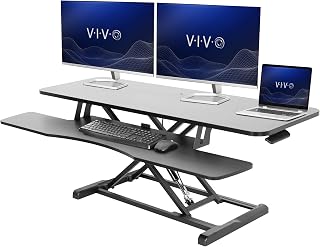


Standing desk, sit-stand desk, or converter?
The important distinction is whether the work surface stays at standing height or adjusts for both sitting and standing. When shopping, look beyond the phrase “standing desk” and confirm how the product changes height. Check the manual for its adjustment method, operating limits, and installation requirements.
A full sit-stand desk replaces your existing desk. The Cubiker Standing Desk, 48x24 Inches, is an electric example in our reviewed list. Its multi-piece desktop has a center seam, and its frame rigidity degrades significantly when elevated. Motorized adjustment alone is not a reason to choose it.
A desktop converter sits on your current desk instead. The VIVO Black 32 in Standing Desk Converter, DESK-V000K, preserves the existing furniture and provides a separate lower keyboard tier. Its compromises are the surface area it occupies and the manual effort needed to lift a loaded setup. A monitor arm is an accessory, not a substitute: raising the screen alone does not raise the keyboard and mouse.
Read the reviews: Cubiker Standing Desk, VIVO Black 32 in Standing Desk Converter
Do you actually need a standing desk?
Consider one if you want to alternate between seated and standing work and your current desk cannot accommodate that routine. The useful question is not whether you can stand all day, but whether the workstation lets you work comfortably in more than one position.
Before buying, adjust the setup you already have. Keep your shoulders relaxed, your keyboard and mouse within easy reach, and your screen positioned so you do not have to crane your neck. For seated work, support your feet and leave room for your legs. If the main problem is screen placement, address that before replacing the whole desk.
If you adopt a sit-stand setup, begin with short standing periods and change position regularly rather than forcing a fixed schedule. Keep taking movement breaks. Set the keyboard around elbow height with relaxed shoulders, and position the top of the screen at or slightly below eye level. Check your manual for model-specific adjustment procedures and safe operation.
What to check before you buy
Our first buying rule is to check wobble at full height: it is the single best test of frame quality. If you can inspect a desk, raise it according to its instructions and assess movement during ordinary typing. Also check stability at your intended working height. For a converter, evaluate the underlying desk as well as the raised platform.
Next, check lift capacity with your monitors, monitor arms, and other gear accounted for. Follow the manual’s definition of the rated load, including whether the desktop counts toward it. A converter also adds its own weight to the host desk, so check that desk’s total load limit. Never exceed a rating to test performance.
For an electric desk, read the motor warranty separately from coverage for the frame and desktop. We treat motor warranty length as a signal of what the maker expects, not proof of longevity. The supplied product data does not include motor warranty terms. Finally, verify height range, cable slack, and clearance for moving parts against the manual before use.
Reviewed converters that fit different existing desks
If your current desk is worth keeping, these converters offer different ways to add standing capability. Choose by workspace fit and load requirements rather than width alone; check each manual for exact dimensions, capacity, and mounting restrictions.
The VIVO Black 48 in Standing Desk Converter, DESK-V048KB, earns our 8.2/10 score. Its 48-inch tier accommodates two large monitors, and its broad base improves load distribution. It requires a deep, structurally sound host desk, however, and the heavy base adds to the load that desk must carry.
The VIVO Black 36 in Standing Desk Converter, DESK-V036KB, scores 8.1/10 and provides width for dual displays on an existing deep desk. Manual lifting effort increases with screen weight. Verify desk depth and overhang clearance before buying.
For a straightforward retrofit, the VIVO Black 32 in Standing Desk Converter, DESK-V000K, scores 7.8/10. It preserves your desk and includes a lower keyboard tier, but consumes substantial surface area. Its stability depends heavily on the furniture beneath it, and lifting a loaded setup still requires manual effort.
Read the reviews: VIVO Black 48 in Standing Desk Converter, VIVO Black 36 in Standing Desk Converter, VIVO Black 32 in Standing Desk Converter
Frequently asked
- Should you stand at a standing desk all day?
- Do not make standing all day the goal. Alternate between sitting and standing, begin with short standing periods, and take regular movement breaks. Adjust your workstation for comfort in each position rather than keeping one compromise height. Follow your desk’s manual when changing height or operating its lift mechanism.
- What height should a standing desk be?
- Set the typing surface around elbow height while your shoulders are relaxed, keeping the keyboard and mouse within comfortable reach. Position the top of the screen at or slightly below eye level. Check the manual for adjustment instructions and confirm the desk’s height range accommodates both your seated and standing positions.
- Can you turn a regular desk into a standing desk?
- Yes. A desktop converter raises your working surfaces on an existing desk. The VIVO Black 32 in Standing Desk Converter, DESK-V000K, is one reviewed option with a lower keyboard tier. Check both products’ manuals for load limits, fit, and clearance, accounting for the converter’s weight as well as your equipment.
- Do you need a monitor arm with a standing desk?
- Not necessarily. First check whether your monitor’s existing stand lets you position the screen comfortably at both desk heights. An arm may help if you need more repositioning. Before installing one, check the arm and desk manuals for screen compatibility, weight limits, desktop suitability, and clamp or grommet clearance.