 Focusrite Scarlett 2i2 4th Gen USB-C Audio Interface
Recorded price: $224.99 · Editorial score: 8.3/10
- Compatible Devices
- Microphone, Instrument, Personal Computer, Tablet, Headphones, Smartphone, Studio Monitors
- Connectivity Technology
- USB
A technical breakdown of whether Focusrite Scarlett interfaces provide enough headphone output power to drive the 250-ohm beyerdynamic DT 990 Pro.
By the Niche Picks editorsUpdated October 16, 20268 min readDrawn from our 30 research-based music production reviews
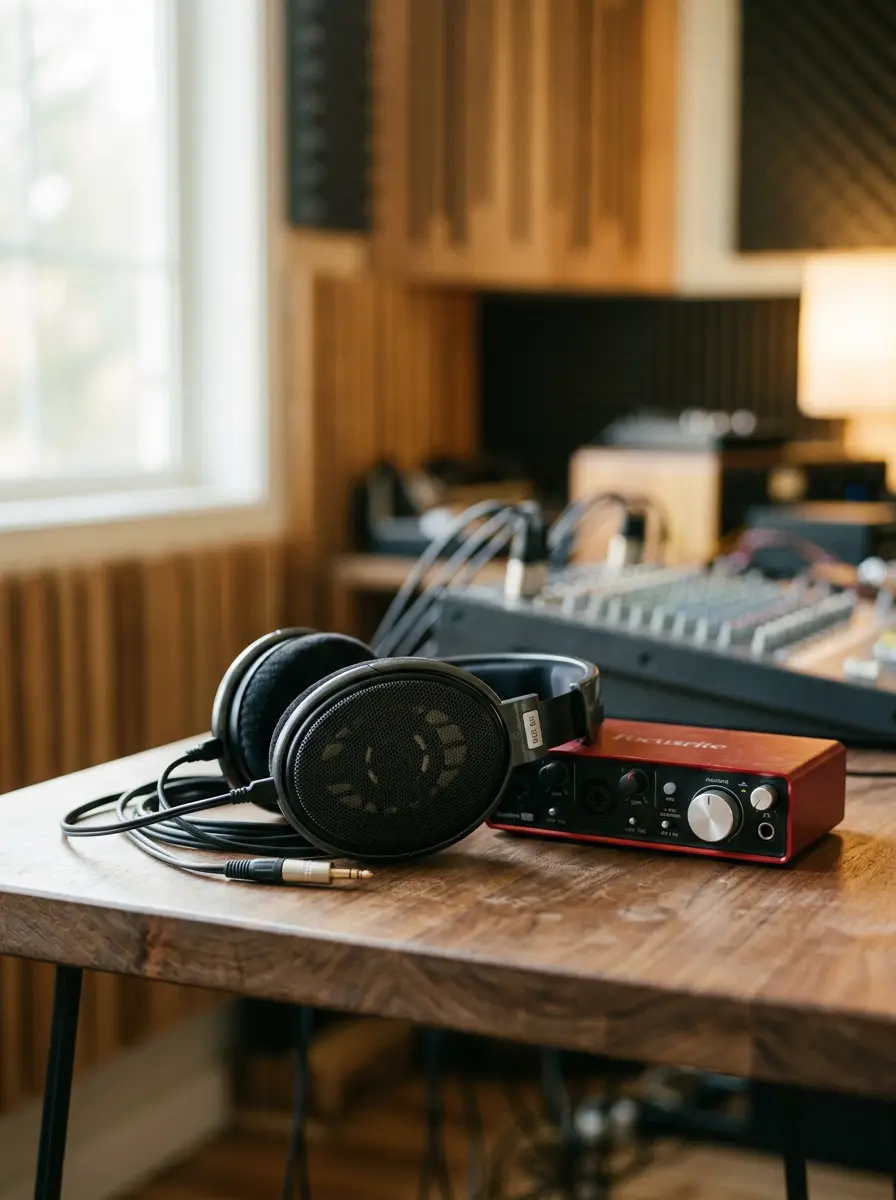
Yes, a Focusrite Scarlett can drive the beyerdynamic DT 990 Pro 250 Ohm, but with caveats. While 4th Generation Scarlett units offer improved conversion and output performance, older 3rd Gen interfaces deliver limited output voltage into high-impedance loads. You will achieve moderate listening levels, but you may lack dynamic headroom for quiet mixes.
Editorial scores and recorded prices are reference points, not measurements of suitability for every use. Read each review's specifications and limitations.
 beyerdynamic DT 990 Pro (250 Ohm), Open-Back Studio Headphones, Black4.6$199.99Our score 7/10Best for Critical mixing and balance checks
 Focusrite Scarlett Solo 3rd Gen USB-C Audio Interface4.6$119.99Our score 7.8/10Best for Single-channel vocal or instrument tracking
 Focusrite Scarlett Solo 4th Gen USB-C Audio Interface4.6$159.99Our score 8/10Best for Solo performers prioritizing driver stabilityFocusrite Scarlett 2i2 4th Gen USB-C Audio Interface4.6$224.99Our score 8.3/10Best for Dual-input tracking and small mobile rigs
| Product | Hardware Type | Connectivity | Key Feature | Price |
|---|---|---|---|---|
| beyerdynamic DT 990 Pro | Open-Back Studio Headphones | Wired 3.5mm with 6.35mm adapter | 250-ohm drivers, replaceable velour pads | $199.99 |
| Focusrite Scarlett Solo 3rd Gen | 2-in / 2-out USB-C Interface | USB-C bus-powered, 1/4" TRS outputs | 56dB preamp gain, direct monitoring toggle | $119.99 |
| Focusrite Scarlett Solo 4th Gen | 2-in / 2-out USB-C Interface | USB-C bus-powered, balanced outputs | 120dB dynamic range, independent headphone pot | $159.99 |
| Focusrite Scarlett 2i2 4th Gen | 2-in / 2-out USB-C Interface | USB-C bus-powered, dual combo inputs | 69dB preamp gain, Auto Gain, Clip Safe | $224.99 |
The direct answer is yes: a Focusrite Scarlett interface will produce sound through the 250-ohm beyerdynamic DT 990 Pro. However, how effectively it drives them depends on the generation of your interface and your required listening SPL. Nominal headphone impedance measures electrical resistance to current; 250 ohms represents a relatively high load compared to consumer cans rated at 32 or 80 ohms. High-impedance headphones demand greater voltage swing from the internal amplifier circuit to push the voice coils efficiently.
On bus-powered audio interfaces, available internal voltage rails are constrained by the host computer's USB port. The Focusrite Scarlett Solo 3rd Gen powers its circuitry through a standard USB connection, meaning its headphone output stage produces modest output swing. When connected to a 250-ohm transducer, the volume knob will typically sit between 75% and 90% for normal listening levels on mastered commercial music. If you are tracking or mixing raw, uncompressed audio with wide dynamic crest factors, you may run out of headroom.
Conversely, the fourth-generation redesign brought measurable updates to the signal chain. Both the Focusrite Scarlett Solo 4th Gen and the dual-input Focusrite Scarlett 2i2 4th Gen incorporate updated converters with 120 dB dynamic range alongside independent headphone volume potentiometers. These revisions deliver a punchier, cleaner output signal that drives 250-ohm loads to comfortable listening volumes without pushing the amplifier circuit into audible distortion. If you are shopping across the best USB audio interfaces, the generation of the unit plays a pivotal role in handling high-impedance gear.
Referenced reviewbeyerdynamic DT 990 Pro (250 Ohm), Open-Back Studio Headphones, BlackRecorded specifications and review trade-offsReferenced reviewFocusrite Scarlett Solo 3rd Gen USB-C Audio InterfaceRecorded specifications and review trade-offsReferenced reviewFocusrite Scarlett Solo 4th Gen USB-C Audio InterfaceRecorded specifications and review trade-offsWhen an audio interface struggles to drive high-impedance loads, the primary symptom is not total silence or immediate clipping. Instead, users encounter restricted acoustic headroom, reduced bass impact, and lower overall volume. Transducers rely on rapid current and voltage swings to reproduce fast transient attacks, especially in the sub-bass and kick-drum registers. If the internal headphone amplifier circuit cannot deliver adequate voltage, the low end may sound slightly constrained or anemic at peak playback levels.
Furthermore, gain staging in a digital audio workstation (DAW) exacerbates this issue. Mastered commercial tracks are compressed and limited to hover near 0 dBFS, which provides adequate loudness even through modest headphone outputs. However, during tracking and rough mixing, individual multitrack channels are recorded with healthy digital headroom, often peaking between -18 dBFS and -12 dBFS to prevent conversion clipping. Under those conditions, an underpowered headphone output may not deliver sufficient volume to let you evaluate quiet vocal transients or subtle reverberation tails.
In our studio methodology, round-trip latency and driver stability take priority over marketing claims about analog preamps. Choosing an interface with reliable low-latency drivers, like those across Focusrite's lineup, ensures you can monitor project software without buffer dropouts. But if you frequently evaluate dynamic orchestral recordings or quiet acoustic instruments, an inadequate headphone amp forces you to push digital faders artificially high, risking downstream mix errors. Understanding what an audio interface does helps you balance output impedance, converter quality, and software driver latency.
The generational differences between Focusrite's 3rd Gen and 4th Gen hardware represent a notable shift in output topology. The third-generation Scarlett Solo houses an extruded aluminum chassis measuring 1.71 by 5.65 by 3.77 inches, relying entirely on bus power over USB-C. Its front-panel quarter-inch headphone jack shares its master output path with a direct monitoring toggle switch. While it handles 80-ohm cans effortlessly, driving the 250-ohm DT 990 Pro pushes the internal amp near its upper ceiling, which can reveal slight noise or flattening of dynamic transients on quiet sources.
With the fourth generation, Focusrite updated the conversion and monitoring architecture. The Scarlett Solo 4th Gen lists updated converters boasting 120 dB of dynamic range, operating at sample rates up to 192 kHz. It separates the headphone potentiometer physically from master monitor controls, providing cleaner individual gain management. Stepping up to the Scarlett 2i2 4th Gen, users gain dual rear combo inputs, independent headphone level potentiometers, and 69 dB of microphone preamp gain. The analog headphone amplification on both 4th Gen devices supplies a cleaner voltage swing into 250-ohm coils than the 3rd Gen architecture.
If you already own a 3rd Gen interface and the volume feels sufficient for your working style, there is no urgent mechanical reason to replace it. However, if you are purchasing new gear from our Music production category, opting for a 4th Gen model ensures that high-impedance headphones operate with greater headroom and cleaner transient reproduction.
Referenced reviewFocusrite Scarlett Solo 3rd Gen USB-C Audio InterfaceRecorded specifications and review trade-offsReferenced reviewFocusrite Scarlett Solo 4th Gen USB-C Audio InterfaceRecorded specifications and review trade-offsReferenced reviewFocusrite Scarlett 2i2 4th Gen USB-C Audio InterfaceRecorded specifications and review trade-offsIn professional music production, transducer design dictates application: closed-back headphones are mandatory for tracking, while open-back models are strictly reserved for mixing and editing. The beyerdynamic DT 990 Pro features open-back earcups that allow sound waves to radiate outward freely rather than bouncing within an enclosed plastic shell. This open architecture eliminates internal acoustic resonance and standing waves, yielding an expansive, natural soundstage and exposing subtle panning placements across the stereo spectrum.
Open-back earcups also relieve acoustic pressure against the eardrum, substantially reducing ear fatigue during extended editing sessions. Beyerdynamic rates the DT 990 Pro across a broad frequency spectrum of 5 Hz to 35,000 Hz, with soft velour earpads that remain comfortable for hours. However, this open acoustic design presents a severe drawback in live recording rooms: sound leaks out of the earcups into open microphones. If a vocalist or acoustic guitarist wears the DT 990 Pro during a take, click tracks and backing instrumentation will bleed directly into the capture, ruining the recording.
For tracking sessions, production rules require closed-back headphones to maintain acoustic isolation. Utilizing closed-back alternatives prevents spill into high-sensitivity condenser capsules. Reviewing our Music production buyer's guide clarifies why many studios invest in both: an open-back pair like the DT 990 Pro for surgical mix balance on your desktop interface, and sealed closed-back headphones for tracking artists at the microphone stand.
For the vast majority of project studio producers, adding a dedicated outboard headphone amplifier to a Focusrite Scarlett interface is unnecessary. An external amplifier introduces extra cabling, takes up physical desk space, and demands additional power outlets. Before spending money on secondary analog signal chains, evaluate whether your current playback volume meets your practical monitoring requirements. If you can set your Scarlett's volume control to roughly 80% and achieve a comfortable, articulate listening environment, an external amp will yield minimal practical benefit.
Dedicated outboard headphone amps become genuinely useful under specific circumstances: when you regularly master classical or film cues with high dynamic range and low baseline RMS, or when multiple performers need independent, high-volume cue mixes simultaneously. If you find your Scarlett 3rd Gen running at 100% volume while still sounding too quiet on quiet multitracks, an affordable linear headphone amplifier connected to the balanced line outputs will provide substantial voltage swing.
However, budget allocation should remain rational. In audio engineering, acoustic room treatment always delivers a higher return on investment than spending on minor interface or amplification upgrades. If you have surplus capital, investing in broadband bass traps and absorption panels will resolve mix translation issues far more effectively than swapping out clean, functional interface conversion. Review our mistakes to avoid in music production to keep your hardware budget focused where it impacts sound quality most.
Setting up the beyerdynamic DT 990 Pro with a Focusrite Scarlett requires proper physical connections and careful digital gain staging. Begin by attaching the included 6.35 mm (quarter-inch) screw-on stereo adapter to the DT 990's 3.5 mm plug. Seat the connector firmly into the front headphone output of your Scarlett. Ensure your interface is connected directly to a powered USB-C or USB 3.0 port on your computer, avoiding unpowered USB hubs that can choke bus-power delivery and limit output headroom.
Next, optimize your software buffer size and driver settings inside your DAW. Focusrite's proprietary low-latency drivers allow you to set low buffer sizes—such as 64 or 128 samples—for live tracking, and higher buffers (512 or 1024 samples) during mixing passes. Driver stability and round-trip latency are essential for keeping virtual instruments in sync. If you are tracking virtual instruments with the DT 990 Pro, low latency ensures that key strikes feel instantaneous.
Finally, establish safe monitoring habits. The DT 990 Pro features an analytical frequency response with pronounced high-frequency detail. Start with the interface headphone volume dial set fully counter-clockwise, start playback of your reference material, and slowly raise the potentiometer until comfortable listening levels are reached. Avoid maximizing the volume pot to compensate for poorly staged tracks; instead, balance channel faders within your software mixer to maintain clean digital headroom without overdriving your interface's analog output stage.
Amazon links are affiliate links; we may earn a commission at no cost to you.
This page summarizes our research reviews of Amazon listings, listed specifications and captured buyer ratings. It is not a hands-on test. Scores are editorial assessments, not measured performance; prices are recorded snapshots and may change. A category can include both main products and accessories, so its overall price range is not the cost of a complete setup.
Most recent product record update: September 29, 2026. Individual records may be older; this is not a verification date for every claim.
Amazon links are affiliate links. We may earn a commission on qualifying purchases, at no extra cost to you.
A more useful shortlist
Choose the product type first. These groups require a match in the listing title; an import search term alone is not enough. Scores rank our recorded research assessments within each group, not independently measured performance.
Focusrite Scarlett 2i2 4th Gen USB-C Audio InterfaceRecorded price: $224.99 · Editorial score: 8.3/10
Focusrite Scarlett Solo 4th Gen USB-C Audio InterfaceRecorded price: $159.99 · Editorial score: 8/10
| Specification | Focusrite Scarlett 2i2 4th Gen USB-C Audio Interface | Focusrite Scarlett Solo 4th Gen USB-C Audio Interface |
|---|---|---|
| Compatible Devices | Microphone, Instrument, Personal Computer, Tablet, Headphones, Smartphone, Studio Monitors | Microphone, Instrument, Personal Computer, Headphones, Studio Monitors |
| Connectivity Technology | USB | USB |
| Item Dimensions D x W x H | 4.61"D x 7.09"W x 1.87"H | 3.78"D x 5.63"W x 1.83"H |
| Item Weight | 1.7 pounds | 14.4 ounces |
Values are shown as recorded, without unit conversions or inferred compatibility. Not recorded means unknown, not absent. Prices are snapshots, not current offers.
beyerdynamic DT 990 Pro (250 Ohm), Open-Back Studio Headphones, BlackRecorded price: $199.99 · Editorial score: 7/10
If a specification, certification or compatibility detail is absent, mark it as unknown and ask the seller or manufacturer. Do not substitute a star rating, an editorial score or a different model's specification.