Design and Build Quality
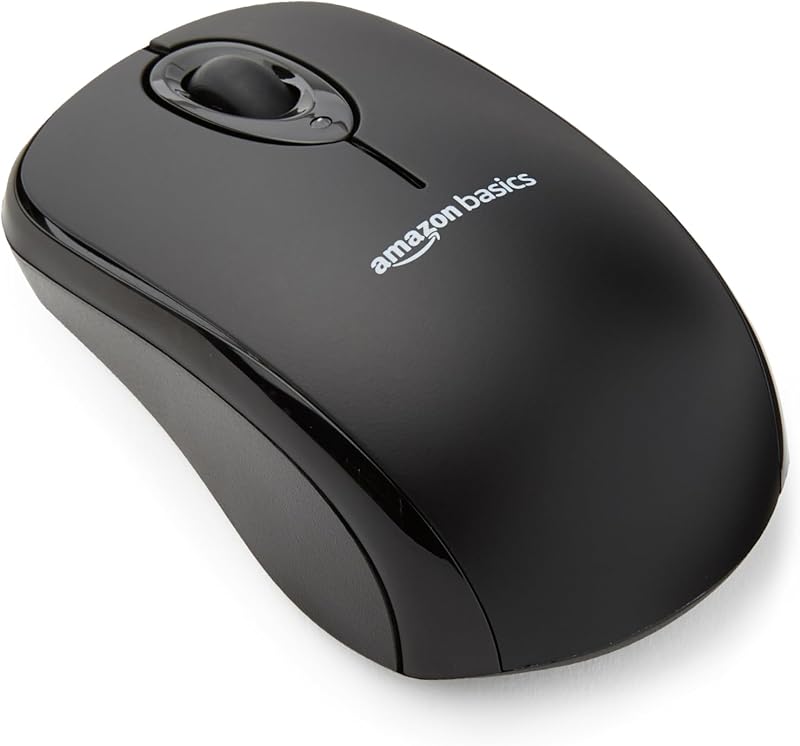
The Amazon Basics wireless mouse adheres to an austere, ambidextrous design language constructed entirely from standard molded plastic. Its chassis features an unadorned symmetrical profile suitable for left- or right-handed grips, housing two primary click switches and a clickable scroll wheel to fulfill the basic three-button configuration. The underside features a dedicated compartment for two AAA batteries alongside an integrated storage slot for the 2.4 GHz USB nano receiver, which keeps the peripheral self-contained during transit. Unlike enthusiast desk accessories that prioritize dense plastics or acoustic dampening, the shell here feels hollow and lightweight, reflecting its budget-focused production. There are no rubberized side grips or textured thumb rests, meaning grip relies purely on the lightly textured matte finish of the plastic casing. Over prolonged use, smooth plastics of this grade inevitably develop shine in high-contact areas, mimicking the wear patterns seen on non-PBT computer components. The build avoids egregious panel flexing, but it remains decidedly basic hardware without structural indulgence.
Real-World Performance
Operation relies on a dedicated 2.4 GHz RF nano-receiver rather than Bluetooth, providing a stable 10-meter operational range free of pairing handshakes. The optical sensor operates up to 1600 DPI, a fixed sensitivity bracket adequate for standard 1080p desktop layouts and document navigation, though it lacks on-the-fly adjustment switches. Tracking remains consistent on conventional cloth mousepads, though tracking irregularities may surface on uneven, reflective, or glass work surfaces where advanced optical sensors normally compensate. The mechanical microswitches under the primary buttons offer a distinct, high-pitched click with moderate travel, avoiding mushiness even if the actuation lacks refined acoustic tuning. Power delivery via two AAA batteries provides dependable uptime without the eventual battery decay inherent to sealed lithium-ion units, though users must manage spare cells. While adequate for standard office multitasking, data entry, and web browsing, the 1600 DPI limit and standard polling parameters prevent this peripheral from serving demanding creative or competitive gaming tasks.
Value for Money
Retailing at $13.50, this unit operates in the lowest price tier for wireless pointer hardware. With an aggregated 4.5 out of 5 stars from nearly 70,000 recorded consumer ratings, its primary market advantage is predictable, low-cost replacement. The inclusion of two AAA batteries directly in the retail package further offsets initial setup expenditure, sparing buyers an immediate ancillary purchase. In the context of curated desk peripherals—where buyers often spend significantly more on gasket-mounted boards, custom keycaps, and ergonomic trackballs—this mouse represents pure consumable utility. It deliberately foregoes luxury materials, onboard profile storage, silent switches, and multi-host Bluetooth toggling to hit its sub-$15 price ceiling. For deploying across multi-station office deployments, spare travel bags, or secondary diagnostic benches, the cost-to-functionality ratio remains exceptionally strong. It performs its single designated job reliably, validating its standing as an economical workhorse that demands very little monetary commitment.
Who Should Skip It
Users spending full eight-hour workdays on detailed CAD drafting, high-resolution photo editing, or rapid data manipulation should look past this mouse. The ambidextrous shell lacks the sculpted palm swells, thumb ledges, and neutral wrist angles necessary to mitigate repetitive strain during marathon typing and pointing sessions. Furthermore, users running modern ultrabooks or tablets restricted to USB-C ports will find the legacy USB-A nano receiver inconvenient, as it requires continuous adaptation. The device also lacks Bluetooth capability entirely, preventing seamless switching across multiple workstations or mobile devices without moving the physical dongle. Enthusiasts seeking quiet office environments should note the audible mechanical switch clicks, which lack silent dampening. Finally, anyone who requires programmable macro buttons, horizontal scroll wheels, or adjustable DPI presets should bypass this model in favor of dedicated ergonomic or productivity mice, as this unit offers only hardwired three-button functionality.