Mechanical keyboards & desk accessories

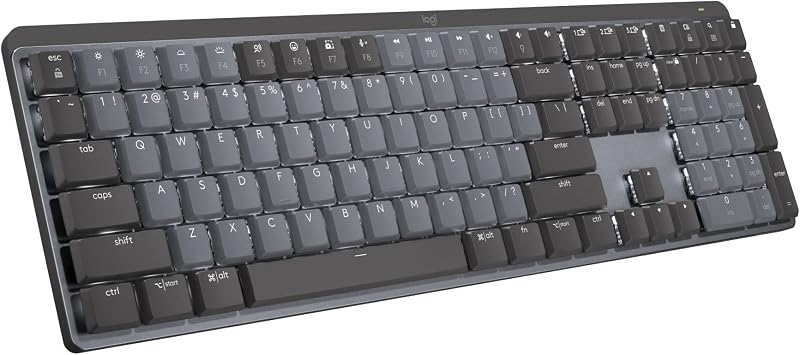
Logitech MX Mechanical Wireless Illuminated Keyboard Tactile - Graphite

The Logitech MX Mechanical provides low-profile wireless productivity with multi-device pairing and smart backlighting for $139.99. However, it foregoes enthusiast-oriented fundamentals such as hot-swappable sockets, gasket mounting, and durable PBT keycaps.

Logitech MX Mechanical Wireless Illuminated Keyboard Tactile - Graphite
Price

$139.99

Amazon rating

4.2

4.2
Ratings

2,249

Best for Multi-device office productivity setups

Built primarily for office productivity, this low-profile board offers reliable wireless connectivity and quiet tactile switches. At $140, the lack of hot-swappable sockets and standard layout customizability limits its lifespan once keycaps or switches wear. It suits multi-device office workflows rather than keyboard hobbyists.

What we like

  • Polished wireless office integration
  • Low-profile tactile switch design
  • Backlit illumination

What to weigh up

  • Premium price without hot-swap flexibility
  • Unlikely to feature durable PBT caps
Check today's price on Amazon

Price and rating were captured on 14/09/2026 and change often. We earn a commission on qualifying purchases.

Our scorecard

Weighted against our category rules
6.7out of 10
Overall
  • Ergonomics and form factor8.0

    Low-profile design minimizes wrist extension during extended work sessions.

  • Wireless connectivity8.8

    Reliable Logi Bolt and Bluetooth pairing across three separate hosts.

  • Acoustics and mount feel6.2

    Lacks gasket mounting and internal acoustic foam for dampening.

  • Moddability and repair4.5

    Soldered switches prevent post-purchase modification or easy repair.

  • Keycap longevity5.8

    Unspecified non-PBT plastic prone to developing shine within a year.

The full review

Design and build construction

The Logitech MX Mechanical weighs 828 grams and measures 26.1 mm tall, delivering a rigid, slim desk profile. Logitech incorporates 45 percent post-consumer recycled plastic in the graphite chassis, capped with an aluminum top plate for structural rigidity. However, the internal layout follows an integrated tray-mount approach rather than a gasket structure. The documentation lists no internal case foam or plate dampeners, resulting in a firm, reverberant bottom-out compared to custom mechanical alternatives. The low-profile keycaps feature translucent laser-etched legends designed for single-color white backlighting. The manufacturer does not specify PBT material, which strongly suggests ABS construction. Based on mechanical keyboard wear patterns, ABS keycaps are prone to developing smooth, shiny surfaces from finger friction within a year of regular use. Replacement cap options remain severely restricted due to non-standard low-profile stem spacing and stabilizer configurations, meaning buyers are locked into the factory keycap profile.

Real-world performance and integration

Daily typing is driven by low-profile tactile quiet switches that register input through a modest tactile bump. The shorter switch travel facilitates brisk text entry, though the absence of internal acoustic foam yields a higher-pitched sound signature than traditional damped boards. The smart backlighting system uses proximity sensors to illuminate keys as hands approach, dimming automatically when idle to conserve energy. Power comes from an integrated 1500 mAh rechargeable lithium-polymer battery charged via USB-C. Logitech claims battery longevity reaches 15 days with active backlighting, expanding to approximately 10 months when illumination remains switched off. Connection options include Bluetooth Low Energy and the proprietary Logi Bolt USB receiver, permitting rapid toggling among three paired machines. Logi Options+ software allows users to remap function keys and establish Logitech Flow cross-computer switching, but the board lacks onboard memory or support for open-source firmware like QMK or VIA for advanced hardware programming.

Value for money assessment

Retailing at $139.99, the MX Mechanical sits in an awkward pricing tier. The general consumer base rates the unit at 4.2 out of 5 stars across 2,249 reviews, reflecting appreciation for its seamless office connectivity, low-profile footprint, and multi-OS support across Windows, macOS, ChromeOS, and Linux. For corporate desk setups, the polished multi-device switching justifies a portion of the expenditure. Nonetheless, viewed through hardware build standards, the value proposition thins out considerably. At $140, mainstream desktop keyboards frequently provide hot-swappable switch sockets, textured PBT keycaps, and layered acoustic silicone. The MX Mechanical omits these longevity features entirely. Buyers are primarily funding proprietary wireless hardware, backlighting automation, and software integration rather than high-grade mechanical architecture. If your priority is typing feel and hardware longevity rather than Logitech ecosystem synergy, comparable capital yields far more refined mechanical platforms elsewhere.

Who should skip this keyboard

Typing enthusiasts who value tactile customization should bypass the MX Mechanical. The switch units are soldered directly to the circuit board; without hot-swap sockets, you cannot replace the tactile switches if your preferences migrate toward linear or clicky mechanisms later. Buyers demanding durable PBT keycaps should also look elsewhere, as the stock caps will eventually shine, and the market provides virtually no third-party keycaps compatible with this low-profile mounting stem. Similarly, typists sensitive to bottom-out harshness should steer clear. Without gasket mounting or acoustic dampening foam to absorb kinetic energy, typing on this board feels rigid and loud in quiet environments. Finally, power users reliant on deep firmware-level customization through QMK or VIA will find the proprietary Logi Options+ software limiting, as it restricts remapping strictly to function keys rather than the full 104-key layout.
Specifications

As listed by the manufacturer
Compatible DevicesPC
Connectivity TechnologyUSB
Additional FeaturesRechargeable
Keyboard Backlighting Color SupportSingle Color
Number of Batteries Required1
Power SourceBattery Powered
Switch TypeTactile
Keyboard LayoutQWERTY
Hand OrientationAmbidextrous
Button Quantity78
Mechanical Keyboard Switch Modellogitech_romer_g_tactile
Minimum Required Operating System VersionChromeOS 137, Mac OS 13 Ventura, Ubuntu 22.04 Jammy Jellyfish, Windows 11
Compatible Operating System FamilyChromeOS, Linux, MacOS, Windows
Number of Keys104
Number of Sections7
ColorGraphite

What the maker claims

  • Tactile Quiet mechanical key switches with a satisfying tactile bump you feel - for precise feedback, reactive key reset, and less noise so your typing doesn't disturb those around you
  • Low-profile keys, more comfort: A keyboard layout designed for effortless precision, with a full-size form factor and low-profile mechanical switches for better ergonomics
  • Smart illumination: Backlit keys light up the moment your hands approach the cordless keyboard and automatically adjust to suit changing lighting conditions
  • Faster workflow, more customization: Customize Fn keys, assign backlighting effects, enable Flow cross-computer, multi-device control, and more in the improved Logi Options+ (1)
  • Multi-device, multi-OS: Pair MX Mechanical Bluetooth wireless keyboard with up to 3 devices on nearly any operating system via Bluetooth Low Energy or included Logi Bolt receiver(2)
  • USB-C quick charging: MX Mechanical keyboard stays powered up to 15 days on a full charge or up to 10 months with the backlighting turned off (3)
  • Plastic parts in MX Mechanical include certified post consumer recycled plastic (Graphite: 45%(5))
  • In case of wireless keyboard or combo (keyboard and mouse), the USB receiver is usually provided either inside the mouse (under the battery cover) or attached within the product packaging

How it compares

Same category
ProductPriceRatingRatings countOur score
Logitech MX Mechanical Wireless Illuminated Keyboard Tactile (this one)$139.994.22,249 ratings6.7
Redragon Mechanical Gaming Keyboard Wired, 11 Programmable B$29.994.36,806 ratings6.4
AULA S99 Gaming Keyboard, Wireless Green Creamy Computer Key$27.994.22,289 ratings6.4
AULA F75 Pro Wireless Mechanical Keyboard,75% Hot Swappable $69.994.61,804 ratings8.7
Logitech G413 SE Full-Size Mechanical Gaming Keyboard - Blac$69.494.51,655 ratings6.7

Common questions

Can I replace the mechanical switches with aftermarket options?
No. The switches are permanently soldered to the printed circuit board. Unlike keyboards equipped with universal hot-swap sockets, the MX Mechanical does not permit users to remove or replace switches without manual desoldering, which voids the warranty and carries a substantial risk of damaging the internal electronics.
Will the keycaps develop shine over time?
Yes. The specifications do not cite PBT plastic, indicating the caps are laser-etched ABS or coated plastic. ABS material naturally polishes under constant fingertip contact, leading to shiny, slick key surfaces within months of daily office use, and finding aftermarket low-profile replacement keycaps is extremely difficult.
Does this board use gasket mounting or sound dampening foam?
No. The keyboard employs an integrated plate design directly anchored to the chassis. Logitech lists no internal acoustic foam, silicone gaskets, or sound-absorbing layers in the specifications. As a result, the typing sensation feels noticeably stiff and lacks the cushioned acoustic dampening common in modern mechanical keyboards.
How long does the battery last on a single charge?
The integrated 1500 mAh battery delivers approximately 15 days of continuous operation with smart backlighting active. Turning the backlighting off entirely stretches operating endurance up to 10 months. The unit recharges via an included USB-C cable, allowing typists to continue working while the battery is replenished.

How we judge mechanical keyboards & desk accessories

  1. Rule 01

    Gasket mounting and case foam change feel more than switch brand.

  2. Rule 02

    Hot-swap sockets keep a board useful after your taste shifts.

  3. Rule 03

    PBT keycaps stay matte; ABS goes shiny within a year.

Ready to buy?

Prices move daily. Check the current listing before you decide — the figures above were captured on 14/09/2026.

View on Amazon