Standing desks & ergonomic office

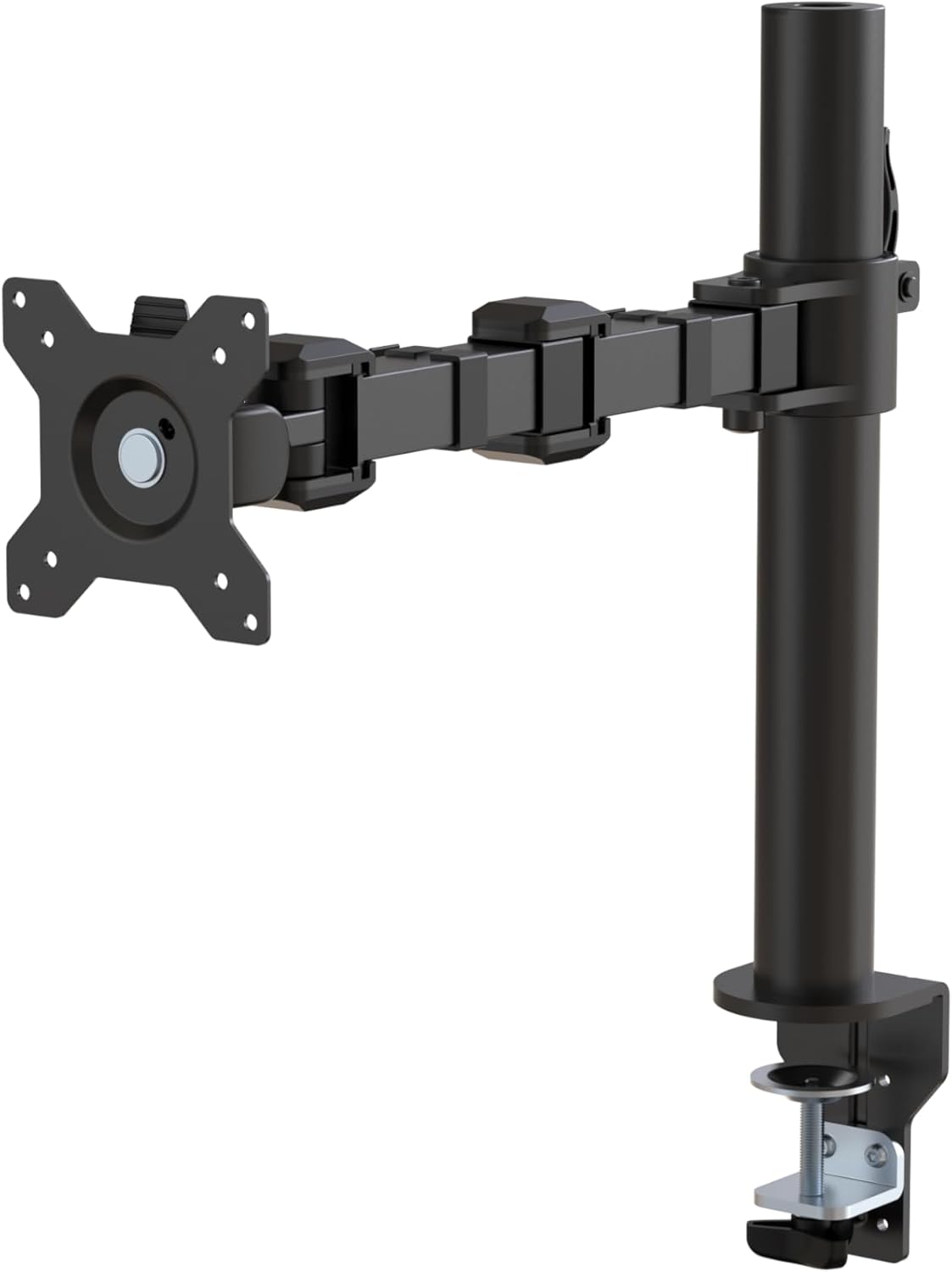
Amazon Basics Single Computer Monitor Stand with Cable Management, Height Adjustable VESA Desk Arm Mount, Fully Adjustable Tilt and Rotation, Steel, Black, Fits 13-30" Screens

The Amazon Basics Single Computer Monitor Stand delivers functional steel construction and fundamental ergonomic adjustments at an entry-level price point. While its mechanical height adjustment lacks dynamic gas-spring fluidity, it securely anchors panels up to 22 pounds on compatible desktop surfaces.

Amazon Basics Single Computer Monitor Stand with Cable Management, Height Adjustable VESA Desk Arm Mount, Fully Adjustable Tilt and Rotation, Steel, Black, Fits 13-30" Screens
Price

$26.24

Amazon rating

4.3

4.3
Ratings

18,334

Best for Budget setups needing static display elevation

An entry-level steel pole mount that reclaims desk area for displays up to 30 inches. Height adjustment requires manually loosening and retightening the bracket collar rather than effortless counterbalanced motion. Ensure your desktop material can support focused clamp pressure.

What we like

  • Rigid steel construction
  • Low price point
  • Integrated cable management clips

What to weigh up

  • Manual collar adjustment lacks dynamic repositioning
  • Limited to 30-inch screen sizes
Check today's price on Amazon

Price and rating were captured on 22/09/2026 and change often. We earn a commission on qualifying purchases.

Our scorecard

Weighted against our category rules
7.1out of 10
Overall
  • Build quality7.2

    Alloy steel construction provides dependable structural rigidity for standard desk environments.

  • Adjustability6.8

    Manual vertical travel from 7.9 to 14.2 inches requires set-screw tightening.

  • Weight capacity8.0

    A 22-pound limit readily handles the majority of 13-to-30-inch displays.

  • Ease of installation7.5

    Detachable VESA bracket streamlines screen mounting for solitary installation.

  • Warranty coverage5.8

    A standard one-year warranty signals modest expectations for prolonged joint wear.

The full review

Design and build

Constructed from alloy steel and finished in matte black, the Amazon Basics DLB111-US290 is designed for utility rather than visual distinction. Weighing 5.6 pounds, the assembly relies on a heavy-duty C-clamp mechanism that accommodates desktops between 0.8 and 3.9 inches in thickness. Buyers using bevelled or non-standard desk edges should verify their frame clearance prior to mounting, as secure clamping requires adequate flat surface contact. Display mounting is managed through a modular plate supporting standard VESA 75 x 75 mm and 100 x 100 mm patterns. This detachable plate configuration allows users to secure the bracket directly to the screen before sliding it onto the arm, reducing the physical strain during installation. Integrated clips along the vertical column and horizontal extension route power and display lines, keeping cabling off the work surface. The structural gauge of the steel is sufficient to eliminate arm flexion under moderate loads, providing a firm, no-frills foundation for compatible screens.

Real-world performance

Movement options include full 360-degree panel rotation between landscape and portrait orientations, vertical arm adjustment from 7.9 to 14.2 inches along the central pole, and a tilt range between -15 and +85 degrees. Because elevation changes rely on mechanical clamping rather than a counterbalanced gas cylinder, height adjustments require loosening a collar, repositioning the display manually, and re-tightening the bolt. This mechanism effectively restricts height modifications to a set-and-forget setup rather than on-the-fly ergonomic transitions. When integrated with standing desks, stability depends significantly on the underlying desktop frame; any inherent wobble in an extended standing desk will transfer directly through the monitor arm to the screen. For displays near the 22-pound upper threshold, tilt tension bolts must be torqued down firmly to prevent unwanted forward drooping. Once secured, the mount holds position without settling, though regular keyboard impact on lighter desks can translate into minor screen resonance.

Value for money

Priced at $26.24, this mount sits firmly in the budget bracket, undercut by very few branded alternatives offering similar load tolerances. With an aggregate rating of 4.3 out of 5 stars derived from over 18,300 customer submissions, its field reliability is well-documented across mass consumer deployments. The low acquisition cost makes it an economical choice for static multi-display configurations or basic home offices that do not require continuous screen repositioning. In standing desk environments where total weight management matters, the stand’s 5.6-pound base weight minimizes the payload penalty against your desk motor’s overall lifting capacity. The tradeoff for this competitive price point is the absence of assisted lifting mechanisms and the restriction to a limited one-year warranty. For users who require dependable mounting without recurring adjustments, the stand returns straightforward functionality that comfortably aligns with its modest cost.

Who should skip it

Operators who continuously switch between seated and standing positions and require immediate, one-handed monitor height adjustments should bypass this unit in favor of a counterbalanced gas-spring arm. The manual bolt adjustment creates too much friction for workflows that mandate frequent panel realignment. It is also unsuitable for ultrawide panels exceeding 30 inches, curved displays that place their center of gravity beyond the arm's tilt axis, or setups heavier than 22 pounds. Workspaces built around glass-topped desks, hollow honeycomb interior tables, or surfaces thinner than 0.8 inches should avoid the standard clamp mount to prevent localized structural failure. Furthermore, commercial environments seeking multi-year hardware assurances will find the one-year manufacturer warranty restrictive compared to institutional-grade ergonomic arms. Users needing extended forward reach or dual-articulation flexibility will be better served by double-jointed mechanical systems.

Specifications

As listed by the manufacturer
BrandAmazon Basics
Global Trade Identification Number00855427008715
UPC855427008715
Unit Count1 Count
ManufacturerAmazon
Number of Items1
Item Weight5.6 pounds
Model NumberDLB111-US290
Mfr Part NumberDLB111-US290
Mounting TypeTabletop Mount
Movement TypeTilt
Compatible DevicesMonitor
Maximum Tilt Angle15 degrees
Enclosure MaterialAlloy Steel
ColorBlack
Maximum-Supported Screen Size30 inches

What the maker claims

  • Desk-mounted single-monitor stand fits most screens 13 to 30 inches and up to 22 pounds; fits desks 0.8 to 3.9 inches thick
  • 360-degree rotation (for landscape or portrait mode); height-adjustable horizontal-arm mount adjusts from 7.9 to 14.2 inches high
  • Full range of motion; adjustable screen tilt from -15 to +85 degrees; cable-management system keeps cords out of the way
  • Easy set-up with a detachable VESA plate (100 x 100mm and 75 x 75mm); all necessary tools and hardware included; made of durable steel
  • Backed by an Amazon Basics limited 1-year warranty

How it compares

Same category
ProductPriceRatingRatings countOur score
Amazon Basics Single Computer Monitor Stand with Cable Manag (this one)$26.244.318,334 ratings7.1
VIVO Black 32 in Standing Desk Converter, DESK-V000K$134.994.615,634 ratings7.8
VIVO Black 36 in Standing Desk Converter, DESK-V036KB$152.994.615,634 ratings8.1
ErGear 48 X 24 Inch Height Adjustable Electric Standing Desk$119.994.511,968 ratings7.4
Claiks Electric Height Adjustable Standing Desk, 48x24 Inch,$109.994.45,460 ratings7.3

Common questions

Does this monitor arm use a gas spring for height adjustment?
No. The arm relies on a manual mechanical collar that clamps onto the central steel pole. To modify the height between 7.9 and 14.2 inches, you must manually loosen the clamp hardware with an Allen key, slide the arm to the desired position, and re-tighten the bolt securely.
Can this mount be installed on a standing desk?
Yes, provided the desk surface measures between 0.8 and 3.9 inches thick. However, monitor arms amplify desktop motion. If your standing desk frame experiences wobble at elevated heights, that oscillation will transfer directly through this rigid steel arm to your monitor, particularly with heavier displays near 22 pounds.
Will this arm support ultrawide monitors under the weight limit?
The manufacturer rates this stand for panels up to 30 inches wide. While an ultrawide screen might weigh under 22 pounds, its extended horizontal width and shifted center of gravity can strain the tilt mechanism, often causing downward screen tilt that cannot be fully corrected by the adjustment bolt.
What tools are required to assemble and install the stand?
All required hardware, including the desktop clamp, VESA screws, and appropriate Allen wrenches, is supplied in the package. You only need to verify that your monitor uses standard 75 x 75 mm or 100 x 100 mm VESA mounting holes and that your desk profile supports the clamp.

How we judge standing desks & ergonomic office

  1. Rule 01

    Wobble at full height is the single best test of frame quality.

  2. Rule 02

    Check lift capacity with your monitors, arms and gear on the top.

  3. Rule 03

    Warranty length on the motor tells you what the maker expects.

Ready to buy?

Prices move daily. Check the current listing before you decide — the figures above were captured on 22/09/2026.

View on Amazon